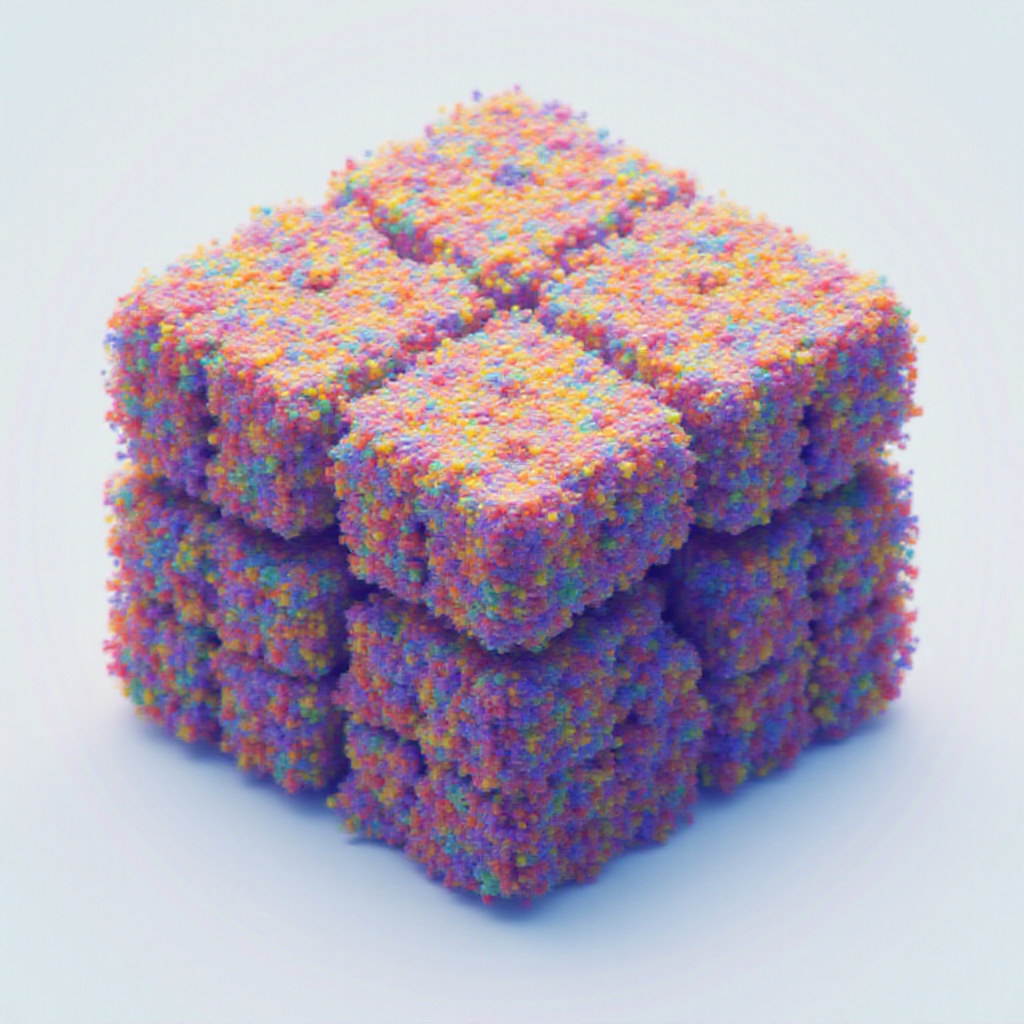
One hashable wrapper for images stored as PIL, NumPy, or PyTorch — convert between them on demand, hash them safely as cache keys, and stop transferring pixel data through disk.












                  ┌──────────────┐
   path / URL ──▶ │              │ ──▶ .pil()           PIL.Image
   bytes      ──▶ │ HashableImage│ ──▶ .numpy()         np.ndarray  (h w 3 | h w)
   ndarray    ──▶ │              │ ──▶ .tensor()        torch.Tensor (1 c h w)
   tensor     ──▶ │  (immutable) │ ──▶ .raw()           native type
   PIL.Image  ──▶ │              │ ──▶ hash(img)        xxhash content fingerprint
                  └──────────────┘
Every accessor returns an independent copy by default. Need the zero-copy view? Use the explicit .numpy_view(), .tensor_view(), .pil_view(), or .raw_view() — and never mutate them.
PixelCache is the glue layer between PIL / NumPy / PyTorch image code that doesn't want to know which one it's holding. Some workflows it makes much simpler:
- ML inference pipelines — Hugging Face / diffusion / SAM-style models want torch tensors; preprocessing libs want NumPy; visualization wants PIL. Wrap once at the input boundary; convert at the call site without copying through
Image.fromarray/torch.from_numpyglue. - Content-addressed caching —
@functools.lru_cacheand@cachetools.cachedneed hashable keys.hash(HashableImage(arr))is a stablexxhashfingerprint of the pixel content, notid(), so the same image hits the cache regardless of which path / array / tensor it came in as. - Mask-driven crop / paste workflows —
mask.mask2bbox()→image.crop_from_bbox(boxes)→ process →cropped.uncrop_from_bbox(base, boxes)lets you run heavy models on the relevant region only, then composite back. - Reproducible test fixtures — feed the same image into
HashableImagefrom any source (path, bytes, ndarray, tensor) and you'll get the same content hash. Useful for snapshot tests and regression suites. - Annotated debug grids —
HashableImage.make_image_grid({"label": [img]})stitches a labeled comparison sheet from a dict of HashableLists. One line. Saves to PNG/JPG. - EXIF-correct phone-photo loading —
HashableImage("IMG_1234.HEIC")decodes viapillow-heif, applies EXIF orientation, and gives you an RGB tensor or array. No more sideways portraits. - Bounding box arithmetic —
BoundingBox(xmin, ymin, xmax, ymax, image_size=...)carries normalized vs. pixel coords explicitly with.xyxy/.xywh/.xyxyn/.xywhn; arithmetic and equality compare by field, not just hash. - Hashable params for ML configs —
HashableDict({"image": img, "prompt": "...", "seed": 42})makes whole inference configurations content-hashable so you can cache by what the call looks like, not by argument identity.
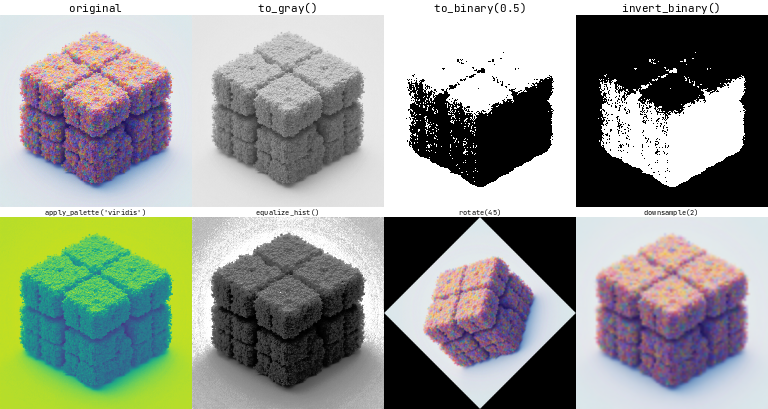
The same HashableImage instance can drive a whole pipeline — color, threshold, palette, geometric ops — without ever touching disk:
from pixelcache import HashableImage, ImageSize

img = HashableImage("photo.jpg").resize(ImageSize(height=256, width=256))

HashableImage.make_image_grid(
    {
        "original":      [img],
        "to_gray()":     [img.to_gray().to_rgb()],
        "to_binary(.5)": [img.to_gray().to_binary(0.5).to_rgb()],
        "apply_palette": [img.to_gray().apply_palette("viridis")],
        "equalize_hist": [img.equalize_hist().to_rgb()],
        "rotate(45)":    [img.rotate(45.0).resize(ImageSize(height=256, width=256))],
    },
    orientation="vertical",
    with_text=True,
).save("transformations.png")
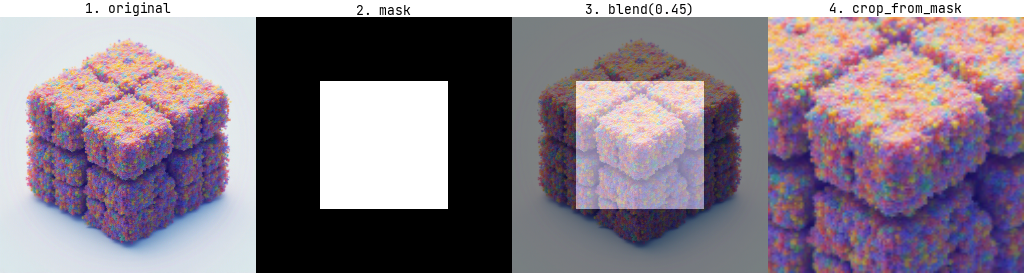
Mask-driven workflows are one chain — derive a mask, blend it for debugging, crop the region of interest:
import numpy as np
from pixelcache import HashableImage

img     = HashableImage("photo.jpg")
h, w    = img.size().height, img.size().width
mask_np = np.zeros((h, w), dtype=np.uint8)
mask_np[h // 4 : 3 * h // 4, w // 4 : 3 * w // 4] = 255    # or any source: torch / PIL / detection model
mask    = HashableImage(mask_np).to_binary(0.5)
debug   = img.blend(mask.to_rgb(), alpha=0.45, with_bbox=False)
region  = img.crop_from_mask(mask)                          # send `region` to your model
The full reproducible generator for both PNGs lives in pixelcache/examples/visuals.py.
# From PyPI
uv add pixelcache
# or
pip install pixelcache

# From source
uv add git+https://github.com/affromero/pixelcache.git
Requires Python ≥ 3.10. Runtime deps: numpy, torch, torchvision, pillow, opencv-python, pydantic, jaxtyping, beartype, xxhash, matplotlib, klogr, einops, pillow-heif, rich, tyro.
HashableImage accepts any of these input types:
| Input | Notes |
|---|---|
str / pathlib.Path |
Local file or HTTP/HTTPS URL — decoded once via torchvision (fast path for JPEG/PNG) or PIL (everything else, plus HEIC) |
bytes |
Decoded eagerly, doesn't retain the buffer |
PIL.Image.Image |
RGBA / P / CMYK / YCbCr / LAB inputs normalize to RGB |
UInt8[np.ndarray, "h w 3"] / UInt8[np.ndarray, "h w"] / Bool[np.ndarray, "h w"] |
uint8 / bool numpy arrays |
Float[torch.Tensor, "1 c h w"] / Bool[torch.Tensor, "1 1 h w"] |
torch tensors in [0, 1] |
import torch
from pixelcache import HashableImage

image = HashableImage(torch.rand(1, 3, 256, 256))
image_pil    = image.pil()              # PIL.Image — safe to mutate
image_np     = image.numpy()            # np.ndarray — safe to mutate
image_t      = image.tensor()           # torch.Tensor — safe to mutate
image_bool   = image.to_binary(0.5)     # → HashableImage in "1" mode

# Zero-copy escape hatches (read-only):
image_np_ro  = image.numpy_view()       # writeable=False
image_t_ro   = image.tensor_view()      # do not mutate
image_pil_ro = image.pil_view()         # do not mutate

# Cache key usage — hash is stable within a process:
cache: dict[HashableImage, str] = {}
cache[image] = "first-seen"image.resize(ImageSize(height=128, width=128)) # bilinear by default
image.downsample(factor=2) # halves both dims
image.rotate(45.0)
image.to_gray() # → "L" mode
image.to_rgb() # → "RGB" mode
image.to_binary(threshold=0.5) # → "1" mode
image.equalize_hist()
image.center_pad(ImageSize(height=512, width=512), fill=255)
image.crop_from_bbox(bboxes)
image.save("/path/to/out.png")Blending two images and saving an annotated comparison grid:
from pathlib import Path

from klogr import get_logger
from pixelcache import HashableDict, HashableImage, HashableList

logger = get_logger()

image0 = "https://images.pexels.com/photos/28811907/pexels-photo-28811907/free-photo-of-majestic-elk-standing-in-forest-clearing.jpeg"
image1 = Path("pixelcache") / "assets" / "pixel_cache.png"

images_hash = [HashableImage(image) for image in [image0, image1]]
for image in images_hash:
    logger.info(f"Image: {image} - Hash: {hash(image)}")
logger.info(f"Hash for list of images: {hash(HashableList(images_hash))}")

image_size = images_hash[1].size()
resized_images = [image.resize(image_size) for image in images_hash]

blended = resized_images[0].blend(resized_images[1], alpha=0.5, with_bbox=False)
blended_bin = resized_images[0].blend(
    resized_images[1].to_binary(0.5).invert_binary(),
    alpha=0.2,
    with_bbox=True,
)

output_debug = HashableDict({
    "image base":              HashableList([resized_images[0]]),
    "image reference":         HashableList([resized_images[1]]),
    "blended_image":           HashableList([blended]),
    "blended_image_binarized": HashableList([blended_bin]),
})
output = image1.parent / f"{image1.stem}_demo_blend.jpg"
HashableImage.make_image_grid(
    output_debug, orientation="horizontal", with_text=True,
).save(output)
logger.success(f"Output saved to: {output}")
Pull a binary mask off a reference image, crop the reference by the mask, then place the crop back onto a base image using mask2bbox. Any chain that produces a HashableImage in binary "1" mode works as the mask input.
from pathlib import Path

from klogr import get_logger
from pixelcache import HashableDict, HashableImage, HashableList, ImageSize

logger = get_logger()

image0 = "https://images.pexels.com/photos/18624700/pexels-photo-18624700/free-photo-of-a-vintage-typewriter.jpeg"
image1 = Path("pixelcache") / "assets" / "pixel_cache.png"

images_hash = [HashableImage(image) for image in [image0, image1]]
image_size = images_hash[1].size()
resized_images = [image.resize(image_size) for image in images_hash]

increased_size_pad = ImageSize(
    width=image_size.width + 1000,
    height=image_size.height + 1000,
)
mask = (
    images_hash[1]
    .center_pad(increased_size_pad, fill=255)
    .resize(image_size)
    .to_gray()
    .to_binary(0.3)
)

cropped = resized_images[1].crop_from_mask(mask)
uncropped = cropped.uncrop_from_bbox(
    base=resized_images[0],
    bboxes=mask.mask2bbox(margin=0.0),
    resize=True,
)

output_debug = HashableDict({
    "image base":      HashableList([resized_images[0]]),
    "image reference": HashableList([resized_images[1]]),
    "cropped_image":   HashableList([cropped.resize(image_size)]),
    "uncropped_image": HashableList([uncropped]),
})
output = image1.parent / f"{image1.stem}_demo_cropUncrop.jpg"
HashableImage.make_image_grid(
    output_debug, orientation="horizontal", with_text=True,
).save(output)
logger.success(f"Output saved to: {output}")
Both examples are runnable as-is from
pixelcache/examples/.
This project follows CLAUDE.md: jaxtyping shape/dtype annotations on public surfaces, klogr.path instead of raw pathlib, no Any/# noqa/# type: ignore in new code, files under 1000 lines, immutable value types where possible.
Contributions are welcome. Open an issue or submit a pull request — pre-commit run --all-files and pytest tests/ must both pass.
MIT — see LICENSE.md.
If you found PixelCache useful, check out some other projects from the same author:
| DiffLogTest | Snapshot testing through print output comparison |
Python · pytest |
| fairtrail | Track flight prices over time. Self-hosted. Bring your own LLM. | Next.js · Prisma |
| gitpane | Multi-repo git workspace dashboard for the terminal | Rust · TUI |
| kin3o | AI-powered Lottie animation generator CLI | TypeScript · LLM |
| pricetoken | Real-time LLM pricing API · REST + npm + historical data | TypeScript |
| yazi-ssh.yazi | Browse remote filesystems in yazi over SSH | Lua · yazi plugin |
| ply2lcc | Convert Gaussian Splats in PLY → XGRIDS LCC format | Python · 3D |
| riasec-co | Bayesian vocational orientation engine for Colombia | npm · PyPI · CRAN |
This is a near-complete rewrite of pixelcache. See CHANGELOG.md for the full breakdown.
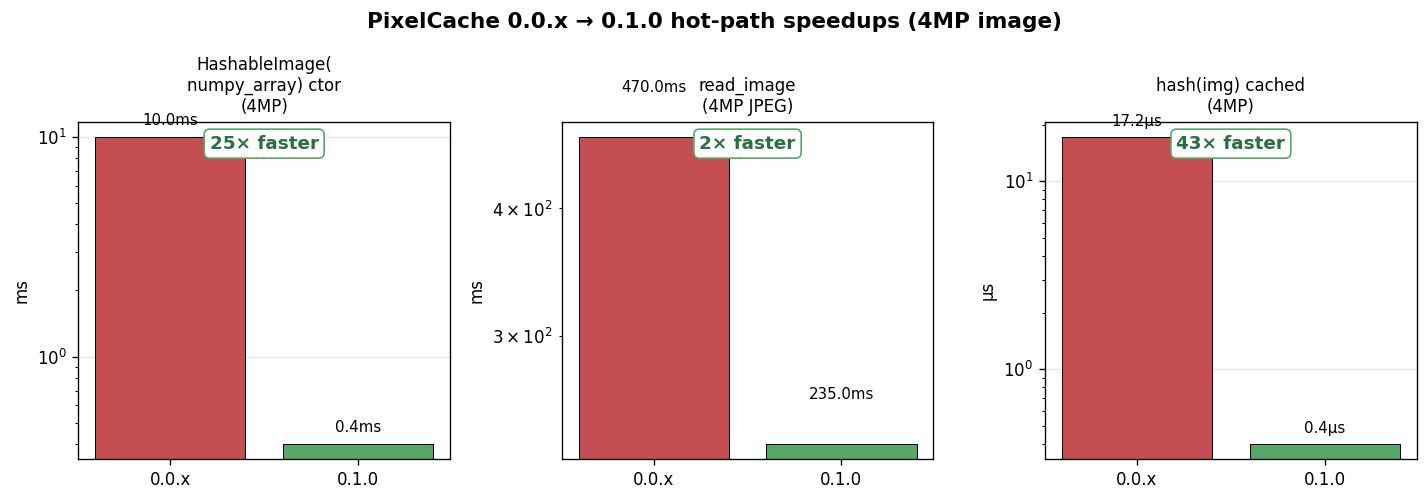
| Operation | 0.0.x | 0.1.0 |
|---|---|---|
HashableImage(numpy_array) ctor |
~10 ms (always wrote a temp PNG to disk) |
<1 ms (lazy — only writes on get_filename()) |
read_image(path) |
Double-decode (EXIF check + actual decode) | Single-decode (one PIL open or torchvision fast-path) |
hash(img) (cached) |
~17 μs (re-materialized full pixel bytes every call) |
~0.4 μs (xxhash content fingerprint cached on the instance) |
img.numpy() |
Returned the internal buffer (footgun) | Returns an independent copy — numpy_view() for explicit zero-copy |
HashableDict / HashableList |
Mutable, with stale-hash hazards | Immutable; deep-copy mutable leaves; read-side leaf protection |
Plus 12+ correctness bugs fixed (ImageCrop dims, Points axes, PIL-mode handling, mask2bbox, bgr2rgb torch path, get_filename fidelity, …) across 8 rounds of adversarial review.