



Parse your shell history. Recover your past. Understand your work.
TermStory turns your terminal history into a searchable, AI-narrated timeline of your development life. It groups shell commands into sessions, correlates Git commits, resolves project names, and renders everything into a high-density TUI dashboard — with a built-in forensic engine that can recover the real dates of commands you typed before you even knew timestamps were missing.
- Forensic timestamp recovery — reconstructs missing dates via git log correlation, file mtimes, Homebrew Cellar mtimes, Docker image inspect, and interpolation between anchors.
- Project attribution — multi-pass detection (cd-tracking → command inference → neighbour propagation) that survives hung NFS mounts and symlink escapes.
- Per-command project context — sessions that
cdbetween projects preserve per-command attribution so search, insights, and exports stay accurate. - AI-narrated timeline — built-in zero-dependency LLM client (urllib only) supporting Groq, OpenAI, and Ollama, with local credential redaction before any prompt is built.
- High-density TUI dashboard — Textual-based UI with focus metrics, streak tracking, RPG classes, fortune-teller, rage-quit detection, vampire index, and on-demand Matrix-style ingestion animation.
- Privacy-first sanitiser —
~/.termstoryignorerules, entropy-based secret detection, and blacklist gating for vault/aws/gh-auth style operations. - Safe concurrent access — atomic config writes with file locking, SQLite WAL mode, and dedup-safe migrations.
- Python: 3.9 or newer
- OS: macOS, Linux, or Windows (PowerShell history supported on Windows)
- Shell: zsh, bash, fish, or PowerShell — zsh with
EXTENDED_HISTORYis recommended (TermStory's Timestamp Detective recovers real dates for any shell that doesn't record them) - No cloud account required for local features; an API key for Groq / OpenAI / Ollama is only needed if you want AI-narrated answers, summaries, and insights.
One-liner (recommended):
curl -fsSL https://raw.githubusercontent.com/bitflicker64/Termstory/main/scripts/install.sh | bashOr from PyPI:
pip install termstoryTermStory works best when your shell records timestamps.
echo '\nsetopt EXTENDED_HISTORY\nsetopt HIST_STAMPS="yyyy-mm-dd"' >> ~/.zshrc
source ~/.zshrc
(If you have old history without timestamps, TermStory's Timestamp Detective will automatically forensically recover real dates.)
# Launch the interactive TUI Dashboard
termstory ui

# View your developer activity for today
termstory today

# Search across your history and session summaries
termstory search authTermStory is organised as a linear ingestion → parsing → timestamp recovery → storage → presentation pipeline. The full architecture is documented in docs/architecture.md; a 30-second overview:
   Shell history files              SQLite (WAL)
   (zsh / bash / fish / pwsh)       termstory.db
           │                              ▲
           ▼                              │
   ┌──────────────┐   sessions    ┌───────────────┐
   │   parser.py  │──────────────▶│  session.py   │  30-min gap grouping
   └──────────────┘               └───────────────┘
           │                              │
           │  raw cmds                    ▼
           │                       ┌───────────────┐
           │                       │  project.py   │  3-pass project detection
           │                       │  (cd → infer  │  + per-command attribution
           │                       │   → neighbour)│
           │                       └───────────────┘
           │                              │
           │                              ▼
           │                       ┌───────────────┐
           │                       │  database.py  │  bulk upsert, dedup, FTS5
           │                       └───────────────┘
           │                              │
           │  if no timestamp             │
           ▼                              ▼
   ┌──────────────────────┐      ┌────────────────────┐
   │ timestamp_detective  │      │ tui.py / cli.py    │
   │ (forensic recovery)  │      │ search / today /   │
   │ git log / file mtime │      │ replay / ask / web │
   └──────────────────────┘      └────────────────────┘
Key files:
| File | Responsibility |
|---|---|
termstory/parser.py |
Shell-history format detection and parsing |
termstory/session.py |
Group commands into 30-minute-gap sessions |
termstory/project.py |
Multi-pass project detection, per-command attribution |
termstory/timestamp_detective.py |
Forensic timestamp recovery |
termstory/database.py |
Thread-safe SQLite (WAL, FTS5, dedup) |
termstory/sanitizer.py |
Local credential / PII redaction |
termstory/ai.py |
Zero-dependency LLM client |
termstory/cli.py |
Typer-based CLI |
termstory/tui.py |
Textual dashboard and all widgets |
| Command | What it does |
|---|---|
termstory ui |
Launch the TUI dashboard |
termstory today |
Show today's work summary (--compare for yesterday delta) |
termstory search auth |
Full-text search across history, sessions, and AI summaries |
termstory search stripe --project "Acme Billing" |
Project-scoped search (per-command aware) |
termstory ask "What was I working on last Tuesday?" |
Natural-language Q&A via BM25 + LLM |
termstory replay 42 |
Replay session 42 at adjustable speed |
termstory web |
Generate a standalone shareable HTML report |
termstory insights |
Executive focus metrics dashboard |
termstory export --format json |
Export sessions as JSON or CSV |
termstory backup ~/termstory.db.bak |
Backup the database |
The full reference lives at docs/cli-reference.md.
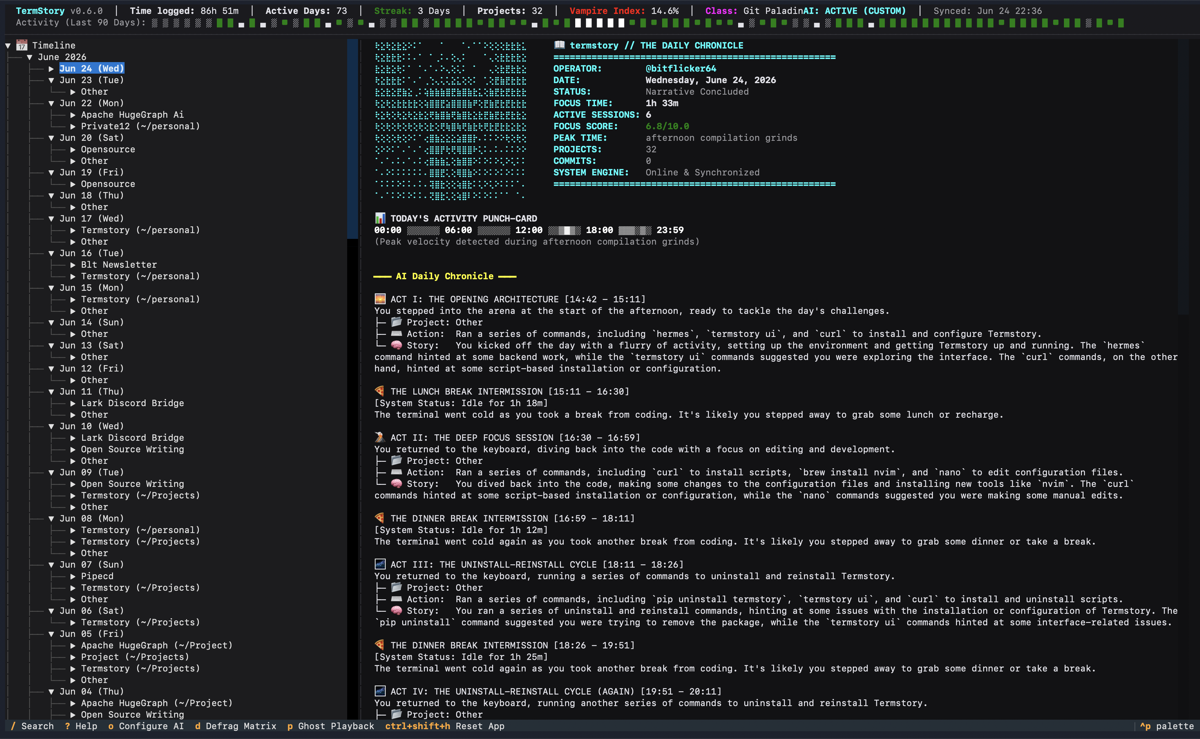
TermStory v0.6.5 — AI-narrated daily chronicle, project timeline, focus metrics, and command playback.
- Architecture & Core Concepts — Project layout, ingestion pipeline, timestamp detective, and git correlation.
- Architecture Decision Log — Resolved architectural threats and remediation decisions.
- Database Schema — Thread-safe SQLite WAL schema and concurrency handling.
- AI Integration — Zero-dependency LLM client supporting Groq, OpenAI, and Ollama.
- TUI & AI Narratives — Dashboard layout, interactive features, and AI-generated logs.
- CLI Reference — Extended subcommands (Predict, Ask, RPG Classes, Replay, etc.).
- Configuration — Setup guide for AI providers and settings.
- Privacy Sanitizer — How TermStory redacts credentials and protects local PII.
- Data Privacy Policy — High-level data-handling trust architecture.
- Troubleshooting — Recovering history and handling common errors.
| Symptom | Likely cause | Fix |
|---|---|---|
| All command timestamps show as today | Your shell isn't writing EXTENDED_HISTORY timestamps |
Enable EXTENDED_HISTORY in ~/.zshrc and re-source; the Timestamp Detective will recover historical dates on next termstory ui |
| AI provider returns auth errors | API key missing or invalid | termstory config set providers.groq.api_key <key> |
| "Permission denied" reading shell history | Shell history file is unreadable | chmod 600 ~/.zsh_history |
| Projects collapsed under "Home" | Project root not under a configured project_roots path |
termstory config list | grep project_roots, then termstory config set project_roots '["~/Projects","~/work"]' |
| Hung on launch with NFS/SMB mount | Filesystem os.listdir blocking |
Add the mount to network_mount_whitelist in config.json, or rely on the built-in 0.5s os.listdir timeout |
Contributions are welcome! Start with CONTRIBUTING.md for setup, then browse the issue list labelled good-pr / good-backend / kind/tests for ideas.
git clone https://github.com/bitflicker64/Termstory.git
cd termstory
python3 -m venv .venv --upgrade-deps
source .venv/bin/activate     # on Windows: .venv\Scripts\activate
pip install -e ".[test]"python3 -m pytest tests/ -vTermStory follows a "density over decoration" philosophy — clean column alignment, simple tables, and minimal spacing. rich.panel.Panel is banned; use dense text separators instead.
Any function that builds an LLM prompt using raw session data must run sanitize_session_commands() (or redact_command() for commit messages) before calling _send_llm_request(). Functions that skip sanitisation are a security bug regardless of how benign the context looks. The pattern is documented in CONTRIBUTING.md.
Use the dedicated uninstaller script — it removes the venv, data directory, and the PATH line that the installer added to your shell RC file:
curl -fsSL https://raw.githubusercontent.com/bitflicker64/Termstory/main/scripts/uninstall.sh | bash -s -- --yesOr run locally:
bash scripts/uninstall.sh --yesOr uninstall by hand (a subset of what the script does):
pip uninstall termstory -y 2>/dev/null
rm -rf ~/.termstory-venv
rm -rf ~/.termstoryMIT © TermStory Contributors
GitHub: https://github.com/bitflicker64/Termstory
PyPI: https://pypi.org/project/termstory/