


SVG tooling monorepo.
This repository contains the SVG language server, parser grammar, editor integration, and the Rust crates that power formatting, linting, color analysis, spec data lookup, and definition/reference navigation.
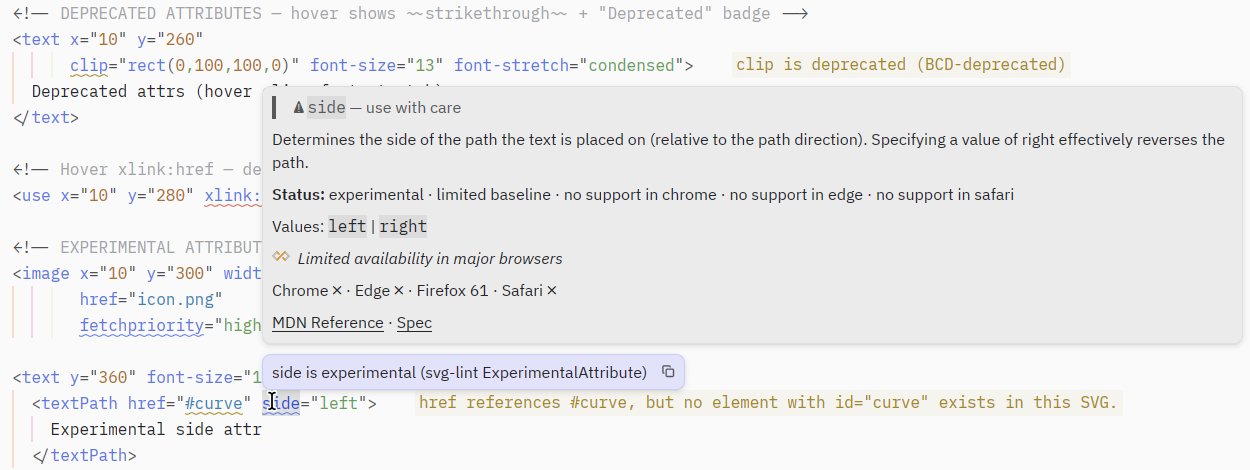
Hover docs with live browser-compat status, deprecated/experimental diagnostics, and missing-reference hints — here in Zed, works with any LSP client.
Important
Published as pre-1.0 (0.x): expect breaking changes between releases while
the workspace is under active development.
From crates.io:
cargo install svg-language-server
cargo install svg-lint
cargo install svg-format
From npm (prebuilt binaries, no Rust toolchain needed):
npm install --global @kjanat/svg-toolkit   # everything at once
# or per tool — unscoped names are aliases of the canonical @svg-toolkit/ ones
npm install --global svg-language-server svg-format @svg-toolkit/svg-lint
There is no unscoped svg-lint on npm: the registry's typosquat filter blocks
the name as "too similar" to the unrelated svglint. Fucking great, thanks npm.
The binary is still called plain svg-lint.
From source:
cargo install --git https://github.com/kjanat/svg svg-language-server| Path | Purpose |
|---|---|
crates/svg-language-server |
LSP binary for SVG files |
crates/svg-format |
Structural SVG formatter library and CLI |
crates/svg-lint |
Structural SVG diagnostics |
crates/svg-color |
Color extraction and color presentation helpers |
crates/svg-data |
Generated SVG catalog from spec, BCD, and web-features data |
crates/svg-data-regen |
Deterministic catalog regeneration pipeline |
crates/svg-references |
Symbol extraction for id, CSS class, and custom property definitions |
crates/svg-tree |
Shared tree-sitter helpers and tree utilities |
grammars/tree-sitter-svg |
Tree-sitter grammar for SVG |
grammars/tree-sitter-svg-paint |
Injected grammar for paint/color attribute values |
grammars/tree-sitter-svg-path |
Injected grammar for path data (d) |
grammars/tree-sitter-svg-transform |
Injected grammar for transform lists |
editors/zed-svg |
Zed extension for SVG language support |
graph BT
  svg-color --> svg-tree
  svg-references --> svg-tree
  svg-lint --> svg-tree
  svg-lint --> svg-data
  svg-tree --> tree-sitter-svg
  svg-color --> tree-sitter-svg
  svg-format --> tree-sitter-svg
  svg-lint --> tree-sitter-svg
  svg-references --> tree-sitter-svg
  svg-language-server --> svg-color
  svg-language-server --> svg-data
  svg-language-server --> svg-format
  svg-language-server --> svg-lint
  svg-language-server --> svg-references
  svg-language-server --> svg-tree
  zed-svg --> svg-language-server
  zed-svg --> tree-sitter-svg
textDocument/hoverfor element and attribute docs, MDN links, and baseline statustextDocument/completionfor SVG element, attribute, value, and inline CSS completionstextDocument/publishDiagnosticsfor structural validation such as unknown elements, invalid nesting, duplicate IDs, deprecated usage, and missing local referencestextDocument/documentColorfor paint color discovery in SVG attributes and embedded stylesheetstextDocument/colorPresentationfor converting colors between multiple CSS/SVG formatstextDocument/definitionfor localidtargets plus CSS class and custom property definitionstextDocument/formattingfor deterministic structural SVG formatting
svg-color recognizes and presents a broad set of CSS/SVG color syntaxes,
including:
- hex
rgb()andrgba()hsl()andhsla()hwb()lab()andlch()oklab()andoklch()- named colors
- derived values from embedded CSS such as
var(...)andcolor-mix(...)
- Rust toolchain
justdprintbun
just build-debug
just verifyjust run-lspjust install-lsp
just install-svg-formatnpm install --global @kjanat/svg-toolkit # all three tools (incl. `svg-ls` alias)
npm install --global svg-language-server # or @svg-toolkit/svg-language-server
npm install --global @svg-toolkit/svg-lint # unscoped name blocked by npm
npm install --global svg-format # or @svg-toolkit/svg-formatEach package resolves a prebuilt binary for the current OS/architecture through
optionalDependencies on @svg-toolkit/* platform packages — no postinstall
step, no install-time downloads outside npm. The @svg-toolkit/* facades are
canonical; the unscoped names are thin aliases that depend on them.
If you want to install directly from GitHub instead of a local checkout:
cargo install --git https://github.com/kjanat/svg svg-language-servercrates/
svg-language-server/ LSP binary and request handlers
svg-format/ formatter library and CLI
svg-lint/ diagnostics engine
svg-color/ color parsing, extraction, and presentation
svg-data/ generated SVG catalog
svg-references/ definition/reference analysis
svg-tree/ shared tree-sitter helpers and tree utilities
grammars/
tree-sitter-svg/ Tree-sitter grammar and language queries
editors/
zed-svg/ Zed extension
docs/
plans/
specs/
samples/ manual fixtures and examples
just format-check
just format
just lint
just typecheck
just test
just verifyServer settings (spec profile, edition pinning, offline mode, drift probe) are
documented in
crates/svg-language-server/README.md;
pass them as LSP initializationOptions.
There is no dedicated VS Code extension yet. Use a generic LSP client extension
like
vscode-lsp-client
and point it at the svg-language-server binary for the svg filetype.
vim.api.nvim_create_autocmd("FileType", {
  pattern = "svg",
  callback = function()
    vim.lsp.start({
      name = "svg-language-server",
      cmd = { "svg-language-server", "--stdio" },
    })
  end,
})For local development, install the extension under editors/zed-svg with:
zed: Install Dev Extension
The extension installs or falls back to the svg-language-server binary and
uses the SVG grammar/query package from this repository.
If you are wiring a separate extension manually, add this to its
extension.toml:
[language_servers.svg-language-server]
languages = ["SVG"]Any LSP-compatible editor works. Point it at svg-language-server --stdio with
filetype svg. The server communicates over stdin/stdout using the standard
Language Server Protocol.
- No rename/refactoring —
id, class, and custom property renames are not yet supported - No workspace-wide diagnostics — only open documents are linted
- Regeneration is networked — normal builds use checked-in catalog data, but
svg-data-regenintentionally contacts upstream specs and compatibility sources when refreshing the catalog
The dprint plugin lives in a separate repository: kjanat/dprint-plugin-svg
- Git tags publish all three binaries (
svg-language-server,svg-lint,svg-format) for every supported target to one GitHub Release. - npm facades
svg-language-server,@svg-toolkit/svg-lint, andsvg-format(the first and last also as@svg-toolkit/twins), the@kjanat/svg-toolkitbundle, and their@svg-toolkit/*platform packages are published from GitHub Actions; the workspace crates are published to crates.io. - Run
just release-local <version>to bump versions, runjust verify, commit, and create the localv<version>tag. This requiresbunlocally. Pushing that tag triggers publication. - See
docs/releasing.mdfor the bootstrap and trusted-publisher details.