








A Linux GUI for SteelSeries Arctis headsets — device settings, 4-channel audio mixer (Game / Chat / Media / Output), automatic media routing, and a full Sonar EQ system powered by PipeWire filter-chain.
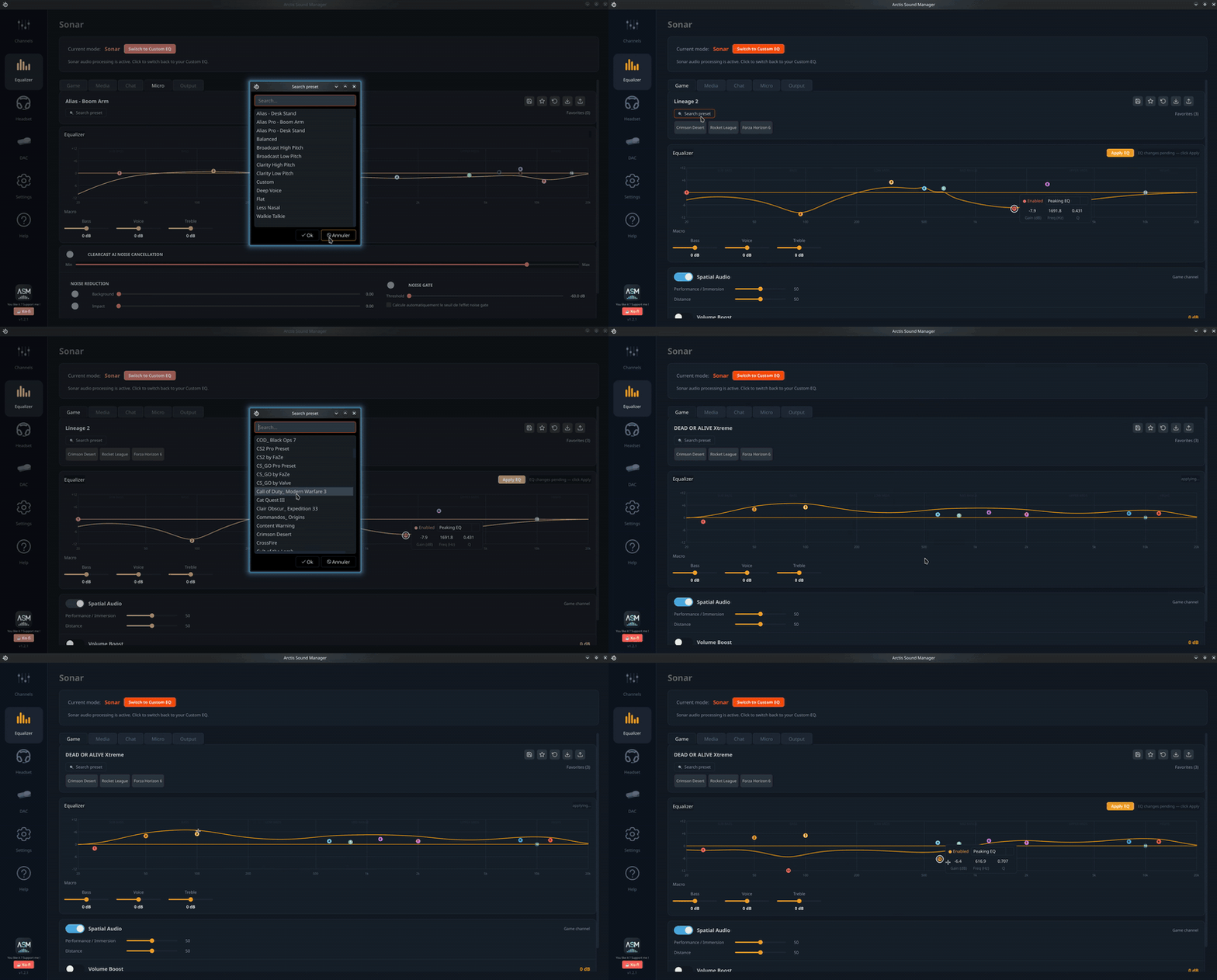
▶ Click to watch the full demo
Supported Arctis headsets on Linux: Arctis Nova Pro Wireless, Arctis Nova Pro Wired, Arctis Nova Pro Omni, Arctis Nova Elite, Arctis Nova 7 (Gen 1 & Gen 2), Arctis Nova 7P, Arctis Nova 5 / 5X, Arctis Nova 3 / 3P / 3X, Arctis 7, Arctis 7+, Arctis 9 Wireless, Arctis Pro Wireless, Arctis 1 / 7X / 7P Wireless, and Arctis GameBuds / GameBuds X — full list with Product IDs in Supported devices.
🎚️ ASM Presets — browse and share community EQ presets! 🎨 ASM Themes — browse and share color themes, previewed on a miniature of the app! 💬 Join the Discord — chat, share presets and get help from the community! 📝 Share your experience in Discussions — feedback helps improve compatibility for everyone!
- Arctis Sound Manager
- Table of contents
- Features
- Screenshots
- Supported devices
- Installation
- First launch
- Upgrading
- How the mixer works
- Sharing and downloading EQ presets
- Virtual surround 7.1
- Themes
- Translations
- Community stats
- Uninstall
- Troubleshooting
- Reporting a bug
- Development
- Project structure
- 💬 Share your experience
- Contributors
- 4-channel mixer — separate Game, Chat, Media and Output virtual sinks
- Automatic media routing — browsers and video players (Firefox, VLC, mpv…) are automatically routed to the Media sink
- Smart stream adoption — apps running when ASM starts are pulled into
Arctis_Mediainstead of staying on a non-Arctis sink - Manual stream control — move any audio stream between channels via G / C / M / O buttons; choices persist across restarts
- Bring audio to headset — one click moves any app that got stuck on the wrong output (HDMI, S/PDIF, another sound card) back to your headset; available on the Home page and in the system tray
- True multichannel output — route apps directly to HDMI or external output (5.1 / 7.1 native passthrough)
- Volume sliders per channel with live percentage display
- Native PipeWire support — detects apps that bypass PulseAudio (mpv, Haruna…)
- Sonar EQ — full SteelSeries Sonar-style parametric EQ (Game / Chat / Micro channels):
- Interactive EQ curve, up to 10 bands per channel
- 312 Game presets, 8 Chat, 14 Mic — searchable, 9 favorite slots
- Macro sliders: Bass / Voice / Treble (±12 dB)
- Spatial Audio — HeSuVi virtual 7.1 surround with Immersion (0–12 dB) and Distance (reverb) sliders
- Volume Boost — up to +12 dB gain at the end of the filter chain
- Smart Volume — dynamic compressor (Quiet / Balanced / Loud)
- All changes applied live via PipeWire biquad nodes
- Custom 10-band EQ — per-band gain (31 Hz – 16 kHz), save/load presets
- Audio Profiles — save and restore your complete configuration in one click (EQ mode, presets, macro values, Spatial Audio, volumes); instant switching from the Home page or system tray
- ANC / Transparent mode — reflects the physical button state in real time
- Device status — battery, mic mute, sidetone, and more
- DAC OLED display (Arctis Nova Pro Wireless / X):
- Toggle original vs custom display mode
- Brightness, screen timeout, scroll speed
- Choose and reorder elements: Time, Battery, Profile, EQ Preset, Weather
- Per-element font size (7–30 pt) · Built-in weather with °C / °F selector
- Self-healing deps — at startup ASM checks every system component (LADSPA plugins, HRIR, PipeWire, wpctl, udev rules…); a one-click dialog installs anything missing with a single
pkexecprompt - Check for updates — in-app button forces an immediate GitHub check; installs via terminal (pacman / dnf / apt) or in-app wheel (pipx)
- One-click bug reports — auto-uploads a full diagnostic as a GitHub gist and opens a pre-filled issue
- Built-in diagnostics —
asm-daemon --verify-setupandasm-cli diagnose -o file.txt - Themes — 5 built-in color themes plus a custom theme editor with live preview; share your own on the community site or import one in a click (details)
- Community translations — new languages from Crowdin download automatically on startup, no release needed
- Help page — built-in manual in English, French and Spanish
ARCTIS_LOG_LEVELenv var —debug/info/warning, honored by daemon, GUI and router
| Home — mixer | Sonar EQ |
|---|---|
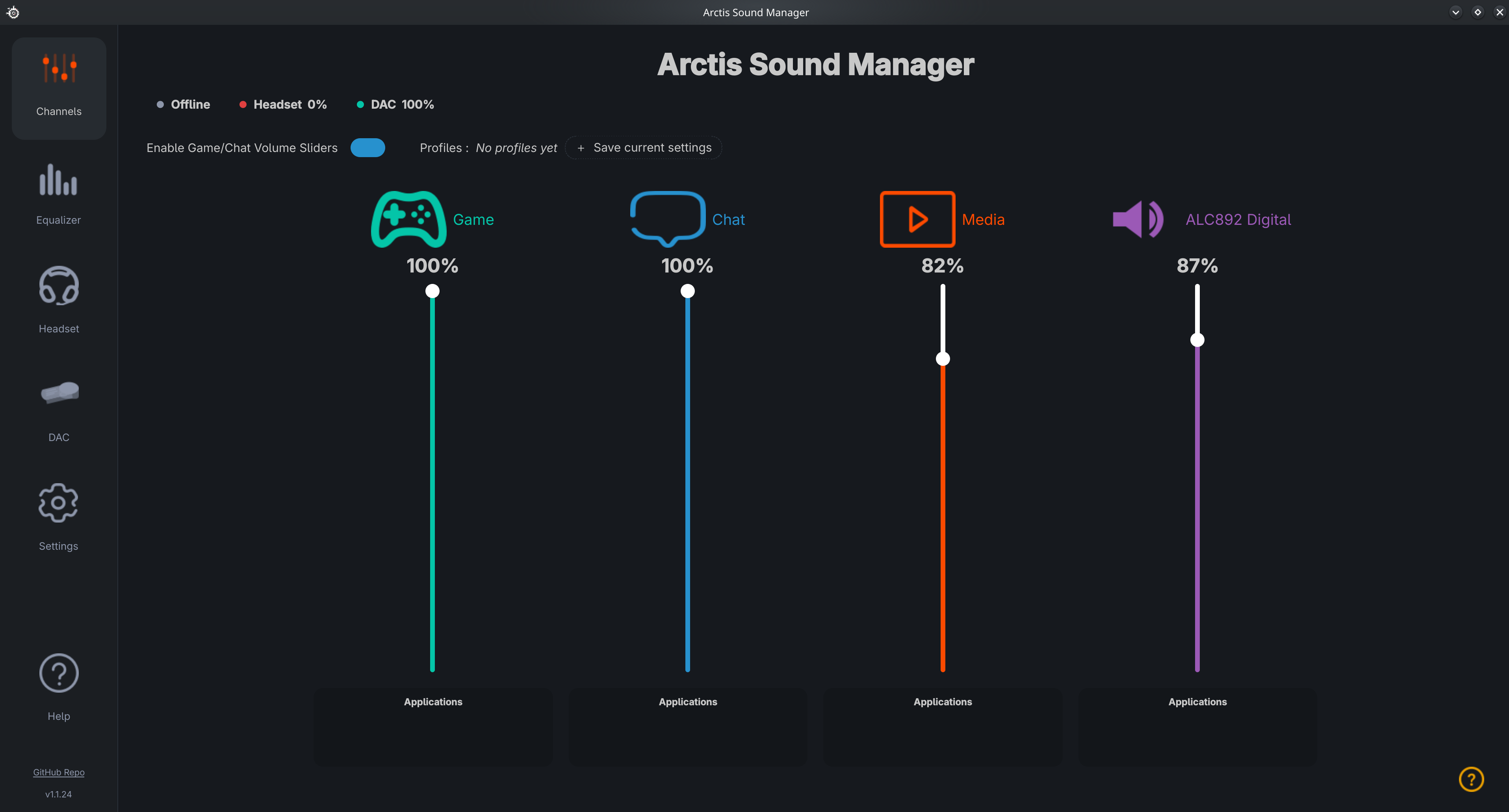 |
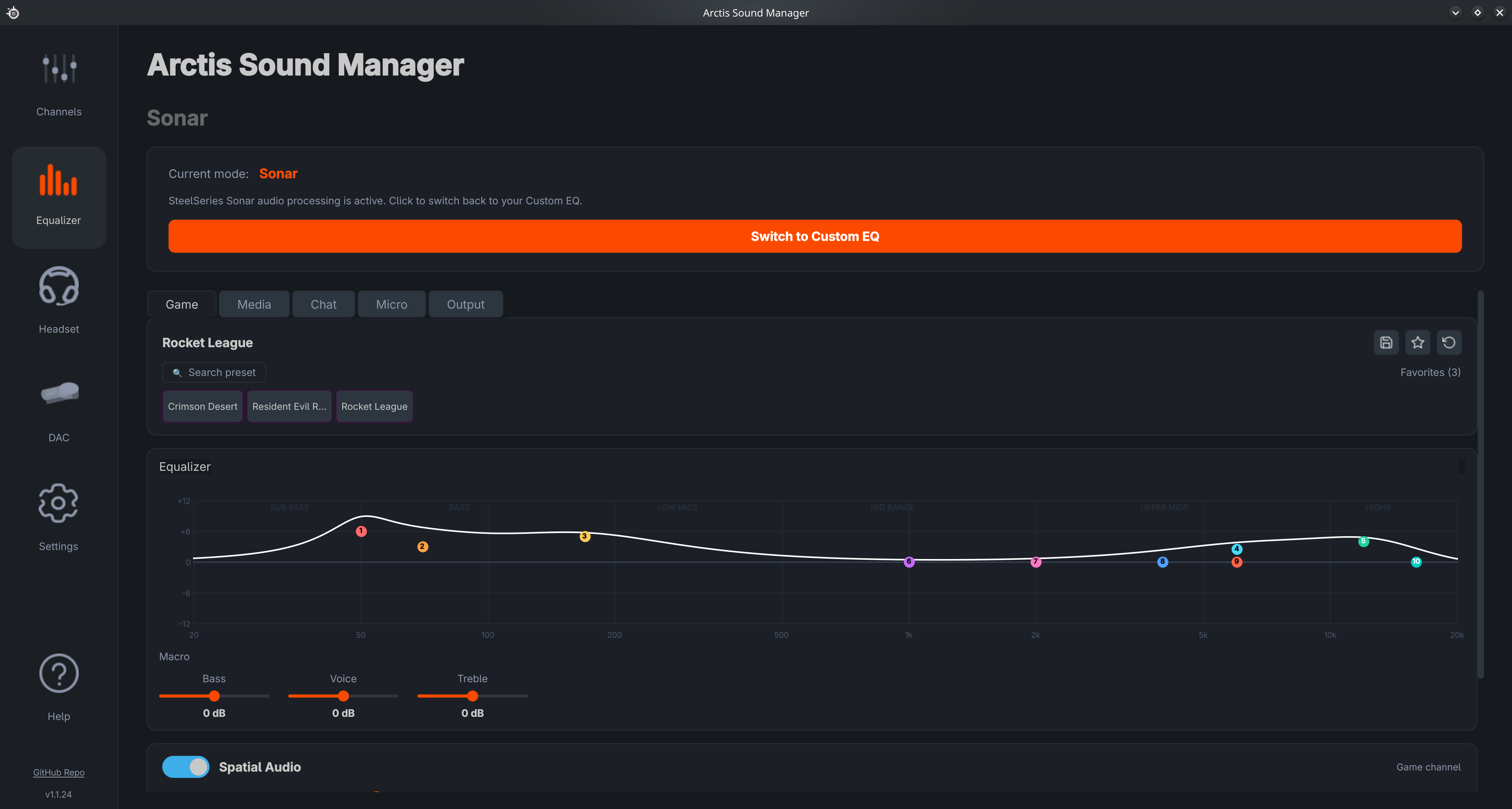 |
| Custom EQ | Settings |
|---|---|
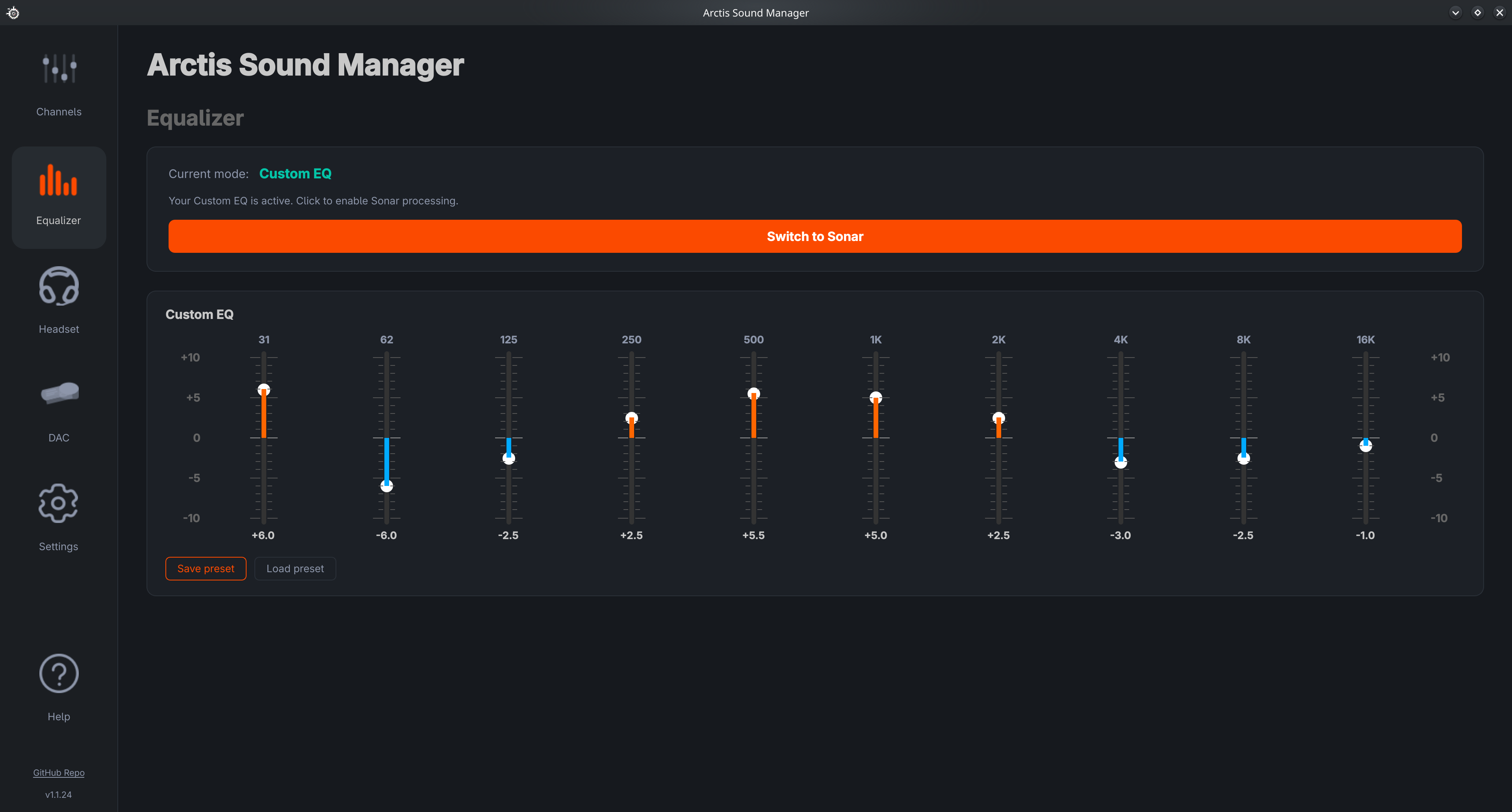 |
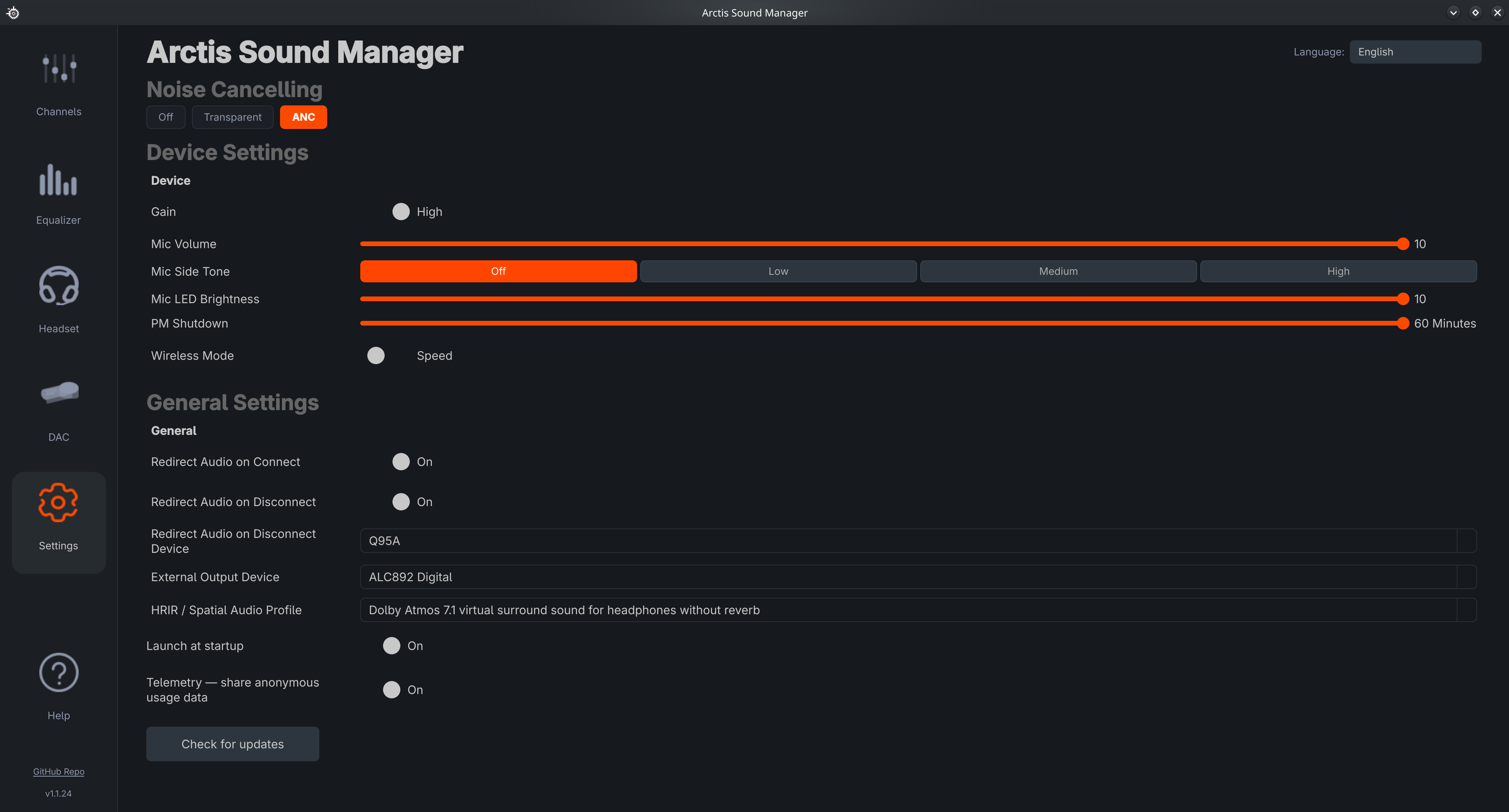 |
| Headset status | DAC — OLED display control |
|---|---|
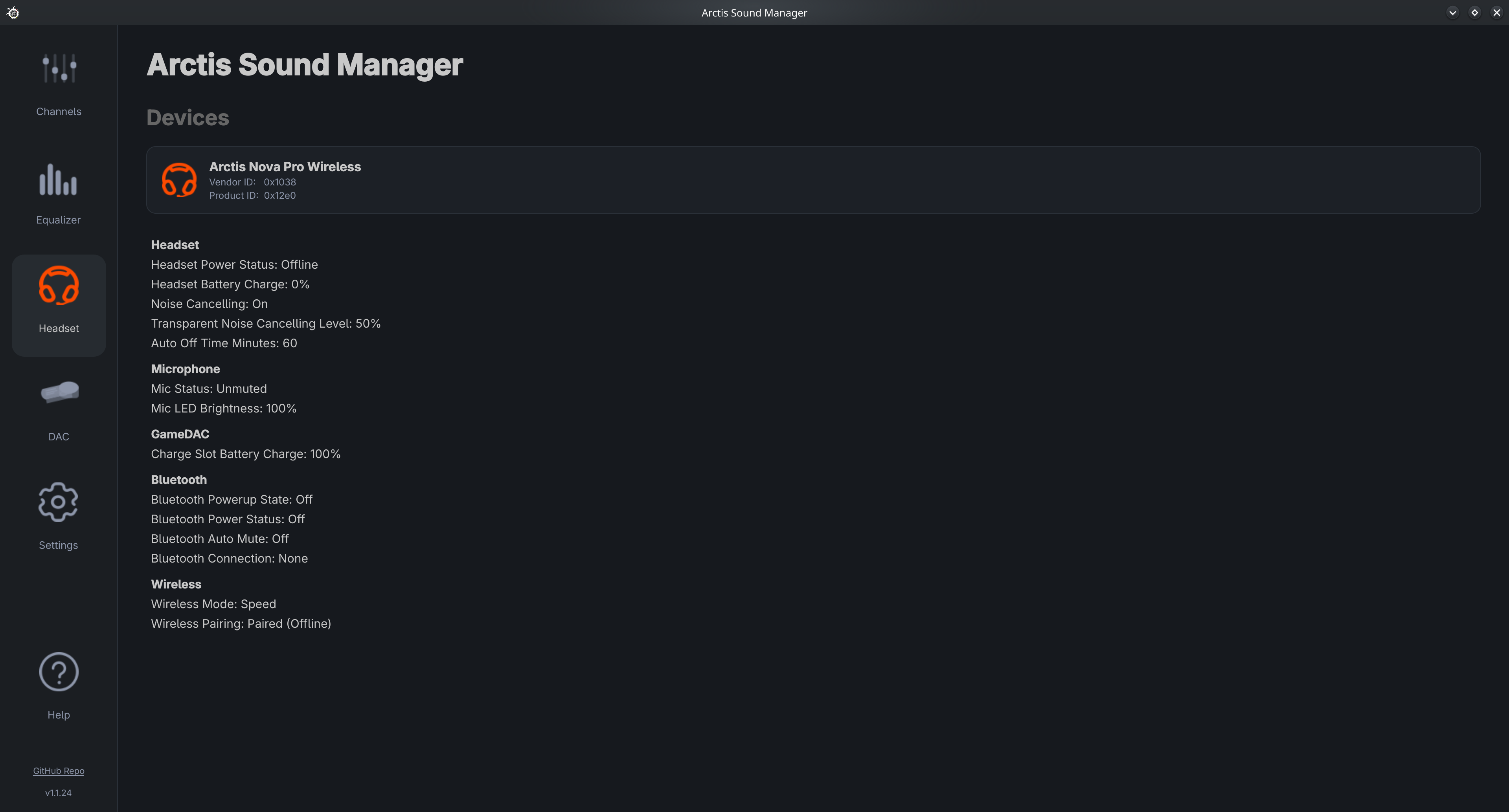 |
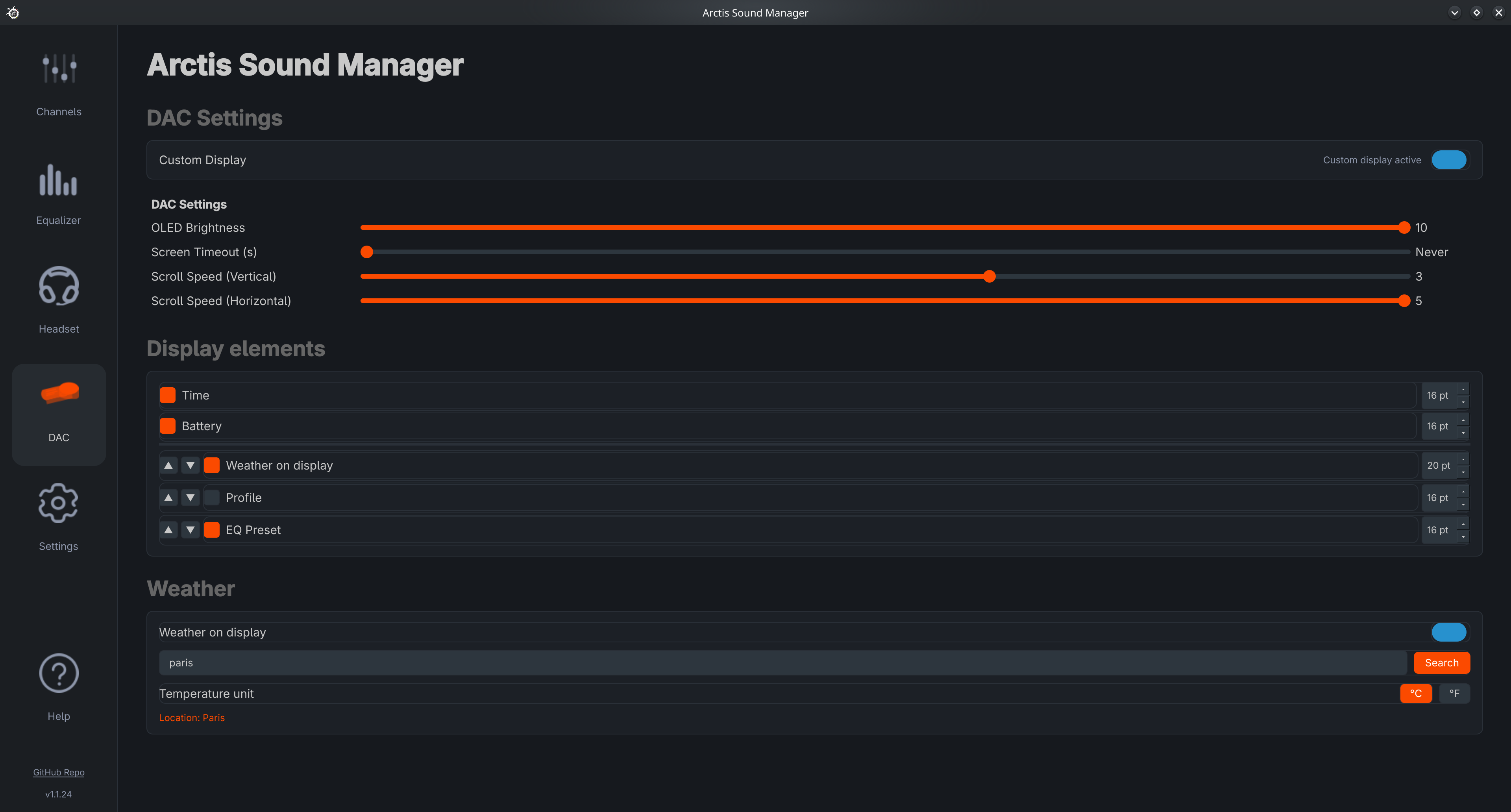 |
| Device | Working | Users | Product ID(s) |
|---|---|---|---|
| Arctis 1 / 7X / 7P Wireless | ✅ | 5 |
|
| Arctis 7 / 7 2019 / Pro 2019 / Pro GameDAC | ✅ | 12 |
|
| Arctis 7+ / PS5 / Xbox / Destiny | ✅ | 12 |
|
| Arctis 9 Wireless | ✅ | 8 | |
| Arctis Pro Wireless | ✅ | 21 |
|
| Arctis Nova Pro Wireless / X | ✅ | 127 |
|
| Arctis Nova Pro Wired / Xbox Wired | ✅ | 11 |
|
| Arctis Nova Pro Omni | ✅ | 5 | |
| Arctis Nova 3 | ✅ | 5 | |
| Arctis Nova 3P / 3X Wireless | ✅ | 12 |
|
| Arctis Nova 5 / 5X | ✅ | 29 |
|
| Arctis Nova 7 Gen 1 | ✅ | 22 |
|
| Arctis Nova 7 Gen 2 | ✅ | 58 |
|
| Arctis Nova 7P | ✅ | 14 |
|
| Arctis Nova Elite | ✅ | 8 |
|
| Arctis GameBuds / GameBuds X | ✅ | 8 |
|
✅ Confirmed by at least one opted-in user 🔵 Product IDs shown in blue are actively in use — detected on real users' devices through the app's anonymous usage stats 🔴 Seen in telemetry but not yet declared in a device YAML — support pending
Find your headset's Product ID (the 4 hex digits after 1038:):
lsusb -d 1038:If your PID isn't listed above, ASM doesn't recognise your headset yet — here's how to get it added.
My headset isn't recognised — how to add it (create the device YAML)
ASM describes each headset with a small YAML "device profile". Adding a new headset means creating (or extending) one of these. Many "new" headsets are just an existing model with a fresh Product ID (e.g. a new colorway) — in that case adding the single PID is enough.
1. Collect your device's USB details
lsusb -d 1038:                         # your PID = the 4 hex digits after "1038:"
lsusb -v -d 1038:XXXX > lsusb.log      # full interface/endpoint layout (replace XXXX with your PID)
asm-cli diagnose -o asm-diagnose.txt   # ASM's view of the device
2. New variant of a model already in the table?
Open the matching profile in ~/.config/arctis_manager/devices/ (e.g. nova_elite.yaml) and add your PID under product_ids::
product_ids:
  - 0x2244
  - 0x2270   # ← your PID
Then restart the daemon and test:
systemctl --user restart arctis-manager.serviceIf the device controls respond, it works. If the daemon log shows Failed to find interface, your command interface differs: set command_interface_index: [<interface>, <alt_setting>] to the HID interface from your lsusb -v that carries the 64-byte interrupt endpoint (often [3, 0]).
ℹ️ Edits under
~/.config/arctis_manager/devices/are perfect for testing, but may be overwritten on update — do step 3 to make support permanent.
3. Open an issue so it ships for everyone
Open an issue and attach lsusb.log + asm-diagnose.txt (and mention whether the quick edit above worked). Brand-new models can need their HID control protocol reverse-engineered from a Windows USB capture, but the lsusb layout is enough to get most variants added in the next release.
Quick install — any distribution, one command:
curl -fsSL https://loteran.github.io/Arctis-Sound-Manager/install.sh | bashIt detects your distribution, installs the matching native package (AUR / COPR / PPA — or a Distrobox container on Bazzite / Silverblue / SteamOS), and runs asm-setup for you. Prefer to read it first? curl … -o asm-install.sh, inspect it, then bash asm-install.sh.
Or install manually for your distribution below. All native packages (AUR / COPR / PPA) pull in every dependency automatically. After installing, run asm-setup once — it configures udev rules, systemd services, PipeWire and downloads the HRIR file.
Arch Linux / CachyOS / Manjaro (AUR)
paru -S arctis-sound-manager
asm-setup
Fedora / Nobara (COPR)
sudo dnf copr enable loteran/arctis-sound-manager
sudo dnf install arctis-sound-manager
asm-setup
Debian / Ubuntu (PPA)
sudo add-apt-repository ppa:loteran/arctis-sound-manager
sudo apt update && sudo apt install arctis-sound-manager
asm-setup
Ubuntu 24.04 (Noble) is the currently supported series. Other series may work via the
.debin each GitHub release.
Immutable distros (Bazzite, SteamOS, Silverblue)
ASM runs inside a Distrobox container and is exported transparently to the host. Run the script for your distro directly — no need to clone:
Bazzite (full deps including noise-suppression-for-voice):
bash <(curl -fsSL https://raw.githubusercontent.com/loteran/Arctis-Sound-Manager/main/scripts/distrobox/bazzite.sh)SteamOS / Steam Deck:
bash <(curl -fsSL https://raw.githubusercontent.com/loteran/Arctis-Sound-Manager/main/scripts/distrobox/steamos.sh)udev rules in
/etc/udev/rules.d/are reset on major SteamOS updates — re-run the script after each upgrade.
Fedora Silverblue / Kinoite:
bash <(curl -fsSL https://raw.githubusercontent.com/loteran/Arctis-Sound-Manager/main/scripts/distrobox/silverblue.sh)Each script is idempotent. Flags: --reinstall (rebuild container), --no-services (skip systemd).
Troubleshooting — text displays as blocks (font rendering issue)
If the ASM interface shows only squares instead of text, your fontconfig cache is likely corrupted. Run inside the Distrobox container:
rm -rf ~/.cache/fontconfig/*
fc-cache -f -v
Then restart ASM. (Thanks to H0DG3 for identifying this fix!)
Troubleshooting — Spatial Audio is silent / audio cuts out inside the container
Inside a Distrobox, ASM's daemon is supposed to talk to your host PipeWire through the sockets the install script forwards (pipewire-0 / pipewire-0-manager) — it must not run a second PipeWire daemon of its own. Two symptoms point at a broken container/host audio split:
-
A second PipeWire is running in the container. The container should only connect to the host graph, never start its own
pipewire.service. Check both sides:# inside the ASM container systemctl --user is-active pipewire filter-chain pipewire --version # on the host (a normal terminal, NOT `distrobox enter`) pipewire --version
If the container and host report different PipeWire versions, the container's
filter-chain(which links to the host daemon across the forwarded socket) can be unstable — a client/server version skew. Align the container'spipewirepackage with the host's, or run ASM natively. -
filter-chainkeeps crashing on PipeWire 1.6.7. A shutdown race in filter-chain 1.6.7 can SIGSEGV when the service is restarted while audio is flowing (which ASM does on EQ/Spatial changes), killing the surround sink. Ifcoredumpctl list pipewireshows repeated crashes tied to toggling Spatial Audio, this is the cause; a PipeWire update on the side that runs filter-chain resolves it.
NixOS (flakes or classic)
ASM ships a first-class NixOS module (nix/module.nix) that wires up udev rules, systemd user services, PipeWire filter-chain, and all LADSPA plugins automatically. The module replaces asm-setup, so you normally don't need to run it — but since v1.1.68 it is safe to do so (the crash on the missing update-desktop-database tool has been removed), which is useful for the HRIR repair described below.
Flake-based config — add to your flake.nix:
inputs.arctis-sound-manager = {
  url = "github:loteran/Arctis-Sound-Manager?dir=nix";
  inputs.nixpkgs.follows = "nixpkgs";
};
Then in your nixosSystem modules:
inputs.arctis-sound-manager.nixosModules.default

{
  services.pipewire = { enable = true; alsa.enable = true; pulse.enable = true; };
  services.arctis-sound-manager.enable = true;
}
Classic config (flakes disabled):
git clone https://github.com/loteran/Arctis-Sound-Manager.git /etc/nixos/Arctis-Sound-ManagerIn /etc/nixos/configuration.nix:
imports = [ /etc/nixos/Arctis-Sound-Manager/nix/module.nix ];
services.pipewire = { enable = true; alsa.enable = true; pulse.enable = true; };
services.arctis-sound-manager.enable = true;
Then rebuild and replug the headset once so udev applies the new rules:
sudo nixos-rebuild switch
⚠️ Spatial Audio first run — required for Game & Media audio: open ASM → Settings → Spatial Audio and pick any HRIR profile. This copies the selected WAV to~/.local/share/pipewire/hrir_hesuvi/hrir.wav(profiles are bundled, no download needed). Without this step, the Game and Media channels are silent — the filter-chain convolver fails to load and only the Chat channel (which has no convolver) produces audio.
Stub HRIR file (installs older than v1.1.68): the HRIR file shipped in the Nix store is a read-only 3.6 KB stub (epoch timestamp) that leaves Game and Media silent. Since v1.1.68,
asm-setupdetects undersized HRIR files and replaces them automatically. On an older install, repair it manually:rm ~/.local/share/pipewire/hrir_hesuvi/hrir.wav && asm-setup
KDE audio popup: the small "Audio Volume" widget in the KDE taskbar only shows physical hardware sinks. The ASM virtual channels (Arctis_Game / Arctis_Chat / Arctis_Media) appear in
pavucontrol→ Playback tab or in KDE System Settings → Audio → Applications. Use those to route each app to the right channel.
Full module docs and options: nix/README.md.
Other distros (from source)
Install system deps first:
# Debian / Ubuntu
sudo apt install pipx libusb-1.0-0 libpulse0 libudev1 swh-plugins curl
# noise-suppression-for-voice (rnnoise LADSPA) is not packaged for Debian/Ubuntu —
# ASM builds it from source automatically when you enable ClearCast mic suppression.

# Fedora / Nobara
sudo dnf install pipx libusb1 pulseaudio-libs systemd-libs ladspa-swh-plugins curl
sudo dnf copr enable lkiesow/noise-suppression-for-voice
sudo dnf install ladspa-realtime-noise-suppression-plugin
Then install ASM:
git clone --branch main https://github.com/loteran/Arctis-Sound-Manager.git
cd Arctis-Sound-Manager
bash scripts/install.sh
PATH tip: if
asm-cliorasm-daemonare not found after install, run:echo 'export PATH="$HOME/.local/bin:$PATH"' >> ~/.bashrc && source ~/.bashrc
USB permissions: if the headset isn't detected, ASM shows a one-click Install rules dialog at startup. Manual fallback:
sudo asm-cli udev write-rules --force --reload
After asm-setup completes, launch the GUI with:
asm-guiOr find Arctis Sound Manager in your application launcher (KDE, GNOME, etc.).
The daemon (
arctis-manager.service) starts automatically at login — the GUI is separate and must be opened manually the first time.
asm-gui --systrayStarts minimised to the system tray. From there you can switch Audio Profiles, open the full window, or quit. This is the recommended mode for daily use.
The easiest way is the in-app toggle: Settings → General → Start with system — ASM handles the correct setup for your desktop environment automatically.
If the toggle doesn't work for your DE, use the manual method:
KDE Plasma / GNOME (systemd user session)
systemctl --user enable --now arctis-gui.serviceAn arctis-gui.service unit is installed by asm-setup. If missing:
asm-cli desktop write
systemctl --user daemon-reload
systemctl --user enable --now arctis-gui.service
Hyprland / Sway / other wlroots compositors
Add to ~/.config/hypr/hyprland.conf (or your compositor's startup config):
exec-once = asm-gui --systrayi3 / bspwm / other X11 WMs
Add to your WM startup file (~/.config/i3/config, ~/.xinitrc, etc.):
asm-gui --systray &Or create an XDG autostart entry:
asm-cli desktop write # writes ~/.config/autostart/arctis-sound-manager.desktop
⚠️ Upgrading to 1.2.1 on Arch — remove, then reinstallUp to 1.2.0, the Arch package shipped its own copies of
dbus-nextandpulsectlinsidesite-packages. From 1.2.1 they are proper dependencies (python-dbus-next,python-pulsectl), so pacman refuses to install those packages over the files the old version still owns, and the upgrade aborts:error: failed to commit transaction (conflicting files) python-dbus-next: /usr/lib/python3.14/site-packages/dbus_next/... exists in filesystemRemove the old package first — it takes its bundled copies with it — then install:
paru -R arctis-sound-manager
paru -S arctis-sound-manager
Your audio profiles in
~/.config/arctis_manager/profiles/are preserved, andasm-setupruns again on install. Fresh installs are unaffected, and later upgrades work normally.Do not reach for
pacman --overwritehere: it leaves the files owned by both packages, and the ASM upgrade then deletes them on its way out — guttingpython-dbus-nextandpython-pulsectl. If you already did, repair them withsudo pacman -S python-dbus-next python-pulsectl.
Arch / CachyOS / Manjaro
paru -Syu arctis-sound-manager && asm-setupFedora (COPR)
sudo dnf upgrade arctis-sound-manager && asm-setupDebian / Ubuntu (PPA)
sudo apt update && sudo apt upgrade arctis-sound-manager && asm-setupFrom source
cd Arctis-Sound-Manager && git pull
pipx install --force .
asm-cli desktop write
asm-cli udev write-rules --force --reload
systemctl --user daemon-reload && systemctl --user restart arctis-manager.service
pipx upgrademay fail on wheel installs — usepipx install --force .instead.
ASM creates 3 virtual sinks on top of your Arctis device plus one external output:
| Sink | Default use | Button |
|---|---|---|
| Arctis_Game | Games, general audio | G |
| Arctis_Chat | Voice apps (Discord, TeamSpeak…) | C |
| Arctis_Media | Browsers, video players | M |
| External Output | HDMI, USB speakers, sound card… (5.1 / 7.1 native) | O |
The media router (asm-router) automatically moves browsers and video players to Arctis_Media. Manual placements via G / C / M / O buttons are saved as persistent overrides.
The External Output card routes audio directly to the physical sink, bypassing virtual stereo sinks — this preserves true 5.1 / 7.1 passthrough. Configure it in Settings → Audio → External Output Device.
ASM lets you share any Sonar EQ preset with one click and import presets shared by the community.
- Open the Sonar EQ tab and select or create a preset.
- Click the Share button (export icon) next to the preset name.
- Choose how to share:
- Copy link — copies an
arctis-asm://import?data=…deep link to your clipboard. - Save as file — saves a
.jsonfile you can send directly. - Publish to community — opens a browser form pre-filled with your preset data; sign in with GitHub and submit.
- Copy link — copies an
- Open the Sonar EQ tab.
- Click Import preset (import icon).
- Paste one of the supported link formats, then click Import:
- ASM deep link —
arctis-asm://import?data=…(generated by ASM's Share button) - SteelSeries community link —
https://www.steelseries.com/deeplink/gg/sonar/config/v1/import?url=…(links from the SteelSeries community or GG software)
- ASM deep link —
ASM automatically detects the link format, downloads the preset if needed, and saves it locally.
You can also double-click an
arctis-asm://link in a browser if you registered the URL handler withasm-setup.
loteran.github.io/asm-presets — browse, vote for, and download EQ presets shared by the community.
| Action | How |
|---|---|
| Browse presets | Open the site — no login required |
| Filter by channel / device | Use the search bar and dropdowns |
| Import a preset into ASM | Click Import in ASM on any card |
| Vote for a preset | Click the ♡ button (requires GitHub login) |
| Publish a preset | Click Share a Preset, sign in with GitHub, fill in the form |
| Delete your preset | Click 🗑 on your own preset card (only visible when logged in) |
Virtual 7.1 surround is included automatically with the install — it deploys a PipeWire HeSuVi filter-chain and downloads the HRIR file. 57 HRIR profiles are bundled and selectable from the Settings tab with instant apply.
                  ┌──────────────────────────┐
 7.1 audio source │  Virtual Surround Sink   │
 (game, movie…) ──►  (PipeWire filter-chain) ├──► Headset (stereo)
                  └──────────────────────────┘
Also available as a standalone repo: arctis-virtual-surround — install virtual surround independently with a single
bash install.sh.
Manual setup (alternative)
bash scripts/setup-surround.shThis installs the filter-chain config in ~/.config/pipewire/filter-chain.conf.d/, downloads the HRIR file, and enables the filter-chain systemd user service.
Advanced: replace ~/.local/share/pipewire/hrir_hesuvi/hrir.wav with any 14-channel HeSuVi-compatible WAV and restart filter-chain manually.
ASM ships 5 built-in color themes: SteelSeries (default), Aurora Glass, Neon Pulse, Slate Premium and Arctic. Switch themes from the dropdown in Settings → Interface Theme — the change applies live to every page, dialog and the tray menu, no restart needed.
Click Create theme in Settings to open the theme editor:
- 15 color pickers grouped into Backgrounds, Accents, Text and Audio channels
- Live preview — the whole app restyles as you pick colors
- Start from scratch or duplicate any existing theme via Duplicate from
User themes are saved as .ini files in ~/.config/arctis-sound-manager/themes/.
Themes are shared exactly like EQ presets, from Settings → Export theme (or the Share button in the theme editor):
- Copy link — copies an
arctis-asm://import-theme?data=…deep link to your clipboard. - Save as file — saves an
.inifile you can send directly. - Publish to community — opens a browser form pre-filled with your theme; sign in with GitHub and submit.
Import theme accepts either form: paste a deep link, load an .ini file, or browse the community site.
loteran.github.io/asm-presets — the same site as the EQ presets, under the Themes tab: browse, vote for, and import themes shared by the community.
Every theme is shown as a miniature of ASM's home page painted in its colors — the sidebar, the four channel cards and their volume sliders — so you can see how a theme actually looks before importing it, not just its palette.
| Action | How |
|---|---|
| Browse themes | Open the site, Themes tab — no login required |
| Import a theme into ASM | Click Import in ASM on any card |
| Vote for a theme | Click the ♡ button (requires GitHub login) |
| Publish a theme | Use Publish to community from ASM, or Share a Theme on the site |
| Delete your theme | Click 🗑 on your own theme card (only visible when logged in) |
Built-in themes cannot be edited or deleted — duplicate one into a custom theme instead.
ASM supports community translations via Crowdin. No release is needed — the app checks GitHub on every startup and silently downloads any updated .ini files.
| Language | Status |
|---|---|
| English | Source (always complete) |
| Français | Bundled |
| Español | Bundled |
| Your language? | Contribute on Crowdin ↗ |
How it works:
- Every day at 06:00 UTC, a GitHub Action pulls approved translations from Crowdin and opens a PR
- On each startup, ASM fetches updated files and saves them to
~/.config/arctis_manager/lang/ - The language selector in Settings updates immediately — no restart needed
- Languages below 80% coverage fall back string-by-string to English
To request a new language, open a GitHub issue. See CONTRIBUTING.md for full details.
Based on 362 unique users (58939 anonymous data points) — last updated 2026-07-15
Anonymous usage data shared voluntarily by opted-in users. View interactive dashboard →
Tested distributions
| Distribution | Install method | Users |
|---|---|---|
| CachyOS | 🎯 AUR | 👥 158 |
| Arch Linux | 🎯 AUR | 👥 62 |
| Linux Mint 22.3 | 🎯 PPA | 👥 19 |
| Fedora Linux 44 (KDE Plasma Desktop Edition) | 🎯 COPR | 👥 19 |
| Nobara Linux 43 (KDE Plasma Desktop Edition) | 🎯 COPR | 👥 18 |
| Ubuntu 26.04 LTS | 🎯 PPA | 👥 12 |
| Nobara Linux 44 (KDE Plasma Desktop Edition) | 🎯 COPR | 👥 9 |
| Pop!_OS 24.04 LTS | 🎯 PPA | 👥 8 |
| Fedora Linux 44 (Workstation Edition) | 🎯 COPR | 👥 8 |
| Ubuntu 24.04.4 LTS | 🎯 PPA | 👥 6 |
| Garuda Linux | 🎯 AUR | 👥 6 |
| Manjaro Linux | 🎯 AUR | 👥 5 |
| EndeavourOS | 🎯 AUR | 👥 4 |
| Bazzite | 📦 Source | 👥 4 |
| SteamOS | 📦 Source | 👥 3 |
| NixOS 26.11 (Zokor) | 📦 Source | 👥 3 |
| NixOS 26.05 (Yarara) | 📦 Source | 👥 3 |
| Artix Linux | 🎯 AUR | 👥 3 |
| Fedora Linux 43 (Workstation Edition) | 🎯 COPR | 👥 2 |
| Debian GNU/Linux 13 (trixie) | 🎯 PPA | 👥 2 |
| Ubuntu 25.10 | 🎯 PPA | 👥 1 |
| SUSE Linux Enterprise Server for SAP Applications 12 SP2 | 📦 Source | 👥 1 |
| Russian Nuclear Submarine Ballast Management Controller BMC (OpenBMC Project Reference Distro) 2.8.2-34 | 📦 Source | 👥 1 |
| PikaOS 4 | 📦 Source | 👥 1 |
| OpenMandriva Lx 26.02 (ROME) Rolling | 📦 Source | 👥 1 |
| Fedora Linux 43 (KDE Plasma Desktop Edition) | 🎯 COPR | 👥 1 |
| Fedora Linux 43 (Cinnamon) | 🎯 COPR | 👥 1 |
| Fedora Linux 41 (Workstation Edition) | 🎯 COPR | 👥 1 |
Most used headsets & distros
| Headset | Installs |
|---|---|
| Arctis Nova Pro Wireless | 127 |
| Arctis Nova 7 (Gen 2) | 58 |
| Arctis Nova 5 Wireless | 29 |
| Arctis Nova 7 (Gen 1) | 22 |
| Arctis Pro Wireless | 21 |
| Arctis Nova 3 | 17 |
| Arctis 7/Pro Gaming | 12 |
| Arctis 7+ | 12 |
| Arctis Nova Pro Wired | 11 |
| Arctis Nova 7P (Gen 2) | 10 |
| Arctis 9 Wireless | 8 |
| Arctis GameBuds | 8 |
| Arctis Nova Elite | 8 |
| Arctis Nova Pro Omni | 5 |
| Arctis 1/7X/7P Wireless | 5 |
| Arctis Nova 7P (Gen 1) | 4 |
| Distribution | Installs |
|---|---|
| CachyOS | 158 |
| Arch Linux | 62 |
| Linux Mint 22.3 | 19 |
| Fedora Linux 44 (KDE Plasma Desktop Edition) | 19 |
| Nobara Linux 43 (KDE Plasma Desktop Edition) | 18 |
| Ubuntu 26.04 LTS | 12 |
| Nobara Linux 44 (KDE Plasma Desktop Edition) | 9 |
| Pop!_OS 24.04 LTS | 8 |
| Fedora Linux 44 (Workstation Edition) | 8 |
| Ubuntu 24.04.4 LTS | 6 |
| Garuda Linux | 6 |
| Manjaro Linux | 5 |
| EndeavourOS | 4 |
| Bazzite | 4 |
| SteamOS | 3 |
Native packages ship a cleanup hook — paru -R / dnf remove / apt remove removes PipeWire configs and restarts pipewire automatically. Audio profiles in ~/.config/arctis_manager/profiles/ are preserved by default.
paru -R arctis-sound-manager        # Arch / CachyOS / Manjaro
sudo dnf remove arctis-sound-manager  # Fedora
sudo apt remove arctis-sound-manager  # Debian / Ubuntu
For source/pipx installs or a full wipe, use the standalone uninstaller:
bash scripts/uninstall.sh           # interactive, auto-detects install method
# or without cloning:
curl -fsSL https://raw.githubusercontent.com/loteran/Arctis-Sound-Manager/main/scripts/uninstall.sh | bash
Uninstall flags
--pipx          # only the pipx install
--pkg           # only the distro package
--all           # both (for duplicate installs)
--all --purge   # also wipe PipeWire configs, HRIR, systemd units, udev rules
--yes           # non-interactive
--purge still preserves ~/.config/arctis_manager/profiles/. A final prompt offers to delete them too for a true clean slate.
ASM has a safety net for the PipeWire audio filter-chain. If that service crashes in a loop (a known issue with very large HeSuVi 7.1 graphs on some builds, e.g. SteamOS), instead of leaving you with audio that cuts in and out, ASM disables the EQ configs and keeps a stable, flat audio path — this is safe mode. While it's active, the Sonar EQ and the virtual 7.1 surround are turned off.
When safe mode is on, a banner appears at the top of the Sonar page:
- Click Re-enable EQ to clear it: ASM restores the EQ configs and restarts the filter-chain. If the graph genuinely still crashes, safe mode re-arms automatically, so you can't get stuck in a crash loop.
- You usually won't need the button: ASM auto-clears safe mode on its own after an ASM or PipeWire version change (the most common way the underlying crash gets fixed), then re-tests the audio graph.
The safe-mode state (and the disabled configs) also show up in the in-app bug report, under Filter-chain safe mode & config presence.
Sometimes an application ends up playing to the wrong output — a TV over HDMI, an S/PDIF port, or another sound card — instead of your headset, so you hear nothing. This happens when PipeWire/WirePlumber remembers an old output for that app.
Click Bring audio to headset to fix it in one click. It finds every app currently playing on a non-Arctis device and moves it back to your default Arctis sink; apps already on a Game / Chat / Media channel are left untouched. It is available in two places:
- The button on the Home page, next to the volume-sliders toggle.
- The system tray menu → Bring audio to headset (a notification reports how many apps were moved).
It is safe to click at any time — if nothing is misrouted, it does nothing.
Open ASM → Help page → Report a Bug. The dialog collects a full diagnostic (version, libs, distro, PipeWire state, USB devices, udev rules, last 100 log lines) and either:
- Submits automatically via
ghCLI — uploads as a secret gist and opens a pre-filled issue - Opens GitHub manually — saves the report to
~/.cache/arctis-sound-manager/reports/for drag-and-drop
asm-daemon --verify-setup           # preflight checks, exits 0/1 with per-distro install hints
asm-cli diagnose -o /tmp/asm.txt    # full local diagnostic dump

ARCTIS_LOG_LEVEL=debug systemctl --user restart arctis-manager
journalctl --user -u arctis-manager -f- Describe expected vs actual behaviour — "Game channel silent after switching to Sonar EQ" beats "audio broken"
- Include steps to reproduce
- One issue per report
python src/arctis_sound_manager/scripts/daemon.py          # daemon
python src/arctis_sound_manager/scripts/gui.py --no-enforce-systemd  # GUI
python src/arctis_sound_manager/scripts/video_router.py # media routerShow project structure
src/arctis_sound_manager/
│
├── scripts/                       # Entry points (installed as CLI commands)
│   ├── daemon.py                  # asm-daemon  — device manager service
│   ├── gui.py                     # asm-gui     — graphical interface
│   ├── video_router.py            # asm-router  — automatic media routing
│   ├── cli.py                     # asm-cli     — udev / desktop / diagnose tools
│   └── setup.py                   # asm-setup   — post-install automation
│
├── gui/                           # PySide6 user interface
│   ├── main_app.py                # Main window + sidebar navigation
│   ├── home_page.py               # Audio mixer (Game / Chat / Media / Output cards)
│   ├── sonar_page.py              # Sonar EQ — presets, Spatial Audio, macro sliders
│   ├── equalizer_page.py          # Custom EQ mode toggle + 10-band sliders
│   ├── headset_page.py            # Device info and live status (battery, mic, ANC)
│   ├── device_page.py             # App settings (language, startup, update check)
│   ├── dac_page.py                # GameDAC OLED control (clock, weather, brightness)
│   ├── help_page.py               # Built-in user manual (EN / FR / ES)
│   ├── theme.py                   # Theme engine — built-in + user themes, QSS
│   ├── theme_editor_page.py       # Custom theme editor with live preview
│   ├── eq_curve_widget.py         # Interactive parametric EQ curve (biquad RBJ)
│   ├── sonar_toggle_widget.py     # Sonar ↔ custom EQ toggle + spatial audio switch
│   ├── anc_widget.py              # ANC / Transparent mode control
│   ├── profile_bar.py             # Audio profile quick-switch bar
│   ├── systray_app.py             # System tray icon + single-instance IPC
│   ├── tray_eq_presets.py         # Tray menu EQ preset switcher
│   ├── status_widget.py           # Headset status widget (battery, mic, sidetone)
│   ├── settings_widget.py         # Settings panel (theme, language, paths)
│   ├── preset_import_dialog.py    # Preset import (ASM link / SteelSeries link / file)
│   ├── preset_export_dialog.py    # Preset export (copy link / save file / publish)
│   ├── preset_share.py            # Preset sharing helpers (deep link encode/decode)
│   ├── report_dialog.py           # One-click bug report (gist + GitHub issue)
│   ├── system_deps_dialog.py      # Self-healing deps check dialog
│   ├── install_dialogs.py         # Package install confirmation dialogs
│   ├── udev_dialog.py             # udev rules install / reload dialog
│   ├── first_run_dialog.py        # First-run wizard (udev, services, HRIR)
│   ├── telemetry_dialog.py        # Anonymous telemetry opt-in dialog
│   ├── dbus_wrapper.py            # Synchronous D-Bus client (daemon ↔ GUI bridge)
│   ├── components.py              # Reusable UI components (cards, sliders, buttons)
│   ├── ui_utils.py                # UI helpers (DPI scaling, icon loading)
│   ├── base_app.py                # Shared QApplication base
│   ├── main_app_proto_widget.py   # Prototype widget base for pages
│   └── presets/                   # Bundled Sonar presets (Game / Chat / Mic)
│
├── core.py                        # CoreEngine — USB lifecycle, polling, device init
├── config.py                      # Device YAML parsing + settings definitions
├── constants.py                   # XDG-compliant path constants (config, data, lang)
├── device_state.py                # Shared physical-node names for audio routing
├── dbus_service.py                # D-Bus interfaces (Settings / Status / Config)
├── loopback_manager.py            # Dynamic pw-loopback sinks (Arctis_Game/Chat/Media)
├── sonar_to_pipewire.py           # PipeWire filter-chain (EQ) config generator
├── pw_utils.py                    # Native PipeWire stream management + routing overrides
├── pactl.py                       # PulseAudio / PipeWire sink and stream helpers
├── service_control.py             # Single entry point for systemctl / dinitctl
├── profile_manager.py             # Audio profiles — snapshot, save, load, apply
├── settings.py                    # Persistent settings (JSON, XDG-compliant)
├── preset_sync.py                 # EQ preset sync (cloud ↔ local)
├── eq_types.py                    # EQ band data types (EqBand, BandType…)
├── oled_renderer.py               # OLED image renderer (PIL)
├── oled_protocol.py               # OLED HID framing (per-device interface / report id)
├── oled_manager.py                # OLED scroll / animation loop + weather clock
├── weather_service.py             # Weather fetch for the OLED (Open-Meteo)
├── hrir_catalog.py                # HRIR profile catalog (57 bundled profiles)
├── bug_reporter.py                # Diagnostic collector for bug reports
├── diagnose.py                    # asm-cli diagnose — full system diagnostic dump
├── system_deps_checker.py         # Startup self-healing dependency checker
├── udev_rules.py                  # udev rule generation (SteelSeries USB rules)
├── udev_checker.py                # udev rule presence / content verifier
├── update_checker.py              # GitHub release update checker
├── lang_updater.py                # Online translation updater (GitHub → ~/.config)
├── telemetry.py                   # Anonymous opt-in usage telemetry
├── autostart.py                   # Autostart management (systemd / XDG / DE-specific)
├── init_system.py                 # Init system detection (systemd vs dinit)
├── systemd.py                     # systemd user unit helpers
├── status_parser_fn.py            # USB HID status frame parser (battery, mic, ANC…)
├── usb_devices_monitor.py         # USB hotplug monitor (pyudev)
├── cli_tools.py                   # Shared CLI utilities
├── log_setup.py                   # Logging configuration (ARCTIS_LOG_LEVEL)
├── i18n.py                        # Translation singleton with EN fallback
├── utils.py                       # Misc helpers
├── lang/                          # Bundled translation files (.ini, one per language)
└── devices/                       # Per-device configuration YAMLs

scripts/
├── install.sh                     # Source installer
├── uninstall.sh                   # Interactive uninstaller (pipx / pkg / all)
├── setup-surround.sh              # Standalone virtual surround setup
├── distrobox/                     # Distrobox scripts (Bazzite, SteamOS, Silverblue)
├── pipewire/                      # PipeWire config templates
└── reverse-engineering/           # USB capture + opcode-decode helpers (new devices)

nix/                               # NixOS module
├── module.nix                     # NixOS module (udev, systemd, filter-chain, LADSPA)
├── package.nix                    # Nix derivation
└── README.md                      # NixOS-specific documentation
Tried ASM on your headset or distro? Found a bug or have a feature idea?
Your feedback helps improve compatibility for everyone — especially for headsets not yet confirmed working.
Thanks to everyone who has contributed code, fixes, or community support:
| Contributor | Contribution |
|---|---|
| Michsior14 | Fix Arctis 7+ power status recognition (#67) |
| H0DG3 | Identified the fontconfig cache fix for font rendering on Bazzite/Distrobox |
| cookiekiller | Diagnosed the loopback watchdog orphan-recreation bug (#84); detailed analysis and fix suggestions for per-channel EQ coupling, Discord routing override, and weather log spam (#85) |
This project is licensed under the GNU General Public License v3.0.
The majority of the source code is original work — Copyright (C) 2026 loteran.
25 files are partially derived from Linux Arctis Manager by Giacomo Furlan (elegos), used under GPL-3.0 — Copyright (C) 2022 Giacomo Furlan (elegos).