Steps to reproduce
- in Design change color to white #fff
- open talk
- open a conversations context menu
Expected behaviour
the selected notification setting should be highlighted in a contrast color - per default this seems #0082c9
Actual behaviour
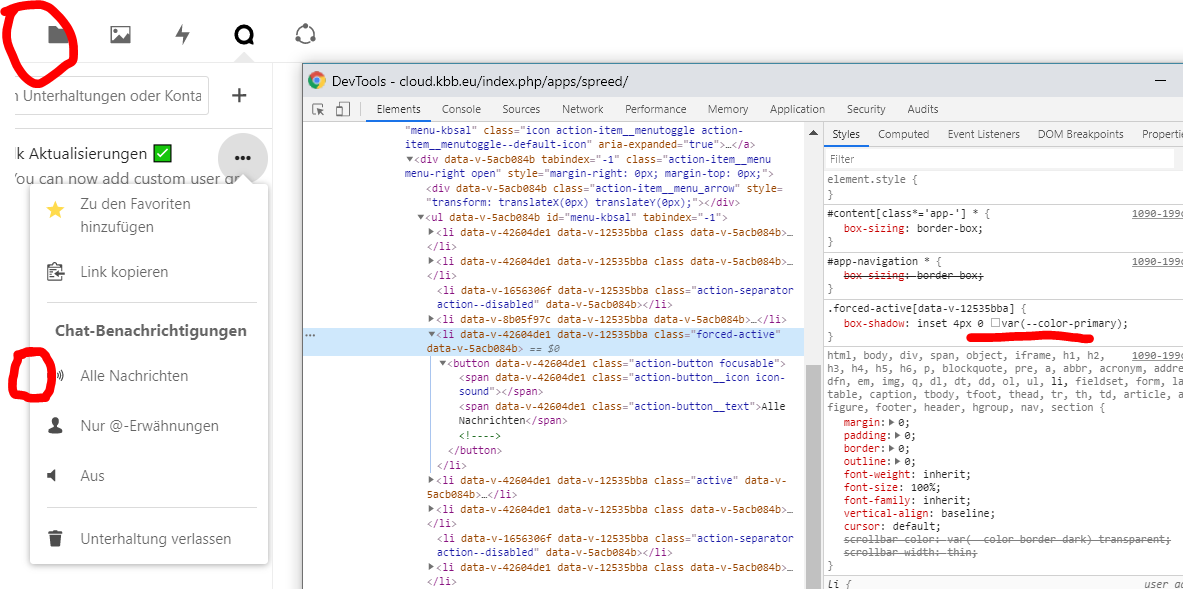
the selected notification setting can not be seen.
the highligt color "box-shadow" is inherited from css value --color-primary, which is customized to white and equals background color
Browser
indep.
Talk app
Talk app version: 8.0.5
Custom TURN server configured: yes/no (see additional admin settings: /index.php/settings/admin/additional)
Custom STUN server configured: yes/no (see additional admin settings: /index.php/settings/admin/additional)
Server configuration
Operating system: Ubuntu/RedHat/...
Web server: Apache/Nginx
Database: MySQL/Maria/SQLite/PostgreSQL
PHP version:
Nextcloud Version: 18.0.3
List of activated apps:
Details
```
If you have access to your command line run e.g.:
sudo -u www-data php occ app:list
from within your server installation folder
```
Nextcloud configuration:
Details
```
If you have access to your command line run e.g.:
sudo -u www-data php occ config:list system
from within your Nextcloud installation folder
```
Server log (data/nextcloud.log)
Details
```
Insert your server log here
```

Steps to reproduce
Expected behaviour
the selected notification setting should be highlighted in a contrast color - per default this seems #0082c9
Actual behaviour
the selected notification setting can not be seen.
the highligt color "box-shadow" is inherited from css value --color-primary, which is customized to white and equals background color
Browser
indep.
Talk app
Talk app version: 8.0.5
Custom TURN server configured: yes/no (see additional admin settings:
/index.php/settings/admin/additional)Custom STUN server configured: yes/no (see additional admin settings:
/index.php/settings/admin/additional)Server configuration
Operating system: Ubuntu/RedHat/...
Web server: Apache/Nginx
Database: MySQL/Maria/SQLite/PostgreSQL
PHP version:
Nextcloud Version: 18.0.3
List of activated apps:
Details
``` If you have access to your command line run e.g.: sudo -u www-data php occ app:list from within your server installation folder ```Nextcloud configuration:
Details
``` If you have access to your command line run e.g.: sudo -u www-data php occ config:list system from within your Nextcloud installation folder ```Server log (data/nextcloud.log)
Details
``` Insert your server log here ```