
TypeFly is a low-latency, LLM-based robot control framework. You type a natural-language instruction; an LLM turns it into an executable plan built from the robot's "skills", and the plan runs to drive the robot. A YOLO vision service supplies the scene description the planner reasons over.
📄 Paper ·
🌐 Project page ·
Requires Python 3.10+, a webcam, and an OpenAI API key.
git clone https://github.com/typefly/TypeFly.git
cd TypeFly
pip install -e .

cp .env.example .env        # then edit .env and add your OPENAI_API_KEY

typefly-run                 # starts the vision service + web UI with one command
Open http://localhost:50000. You'll see your webcam feed with live object detections, and a
chat box to drive the robot. The first run downloads the YOLO weights (~50 MB) and may take
a minute — the launcher waits for the vision service before opening the UI. Press Ctrl-C to
stop everything.
typefly-runruns the two TypeFly processes for you (vision service first, then the web UI). To run them separately — e.g. on different machines — usetypefly-servingandtypefly-webui, or the module formspython -m typefly.servingandpython -m typefly.webui. When the vision service is on another host, setEDGE_SERVICE_IP/EDGE_SERVICE_PORTfor the UI.
Type these in the chat box. The default virtual robot can find, measure, and photograph
what it sees through the webcam (it doesn't physically move):
Find an apple.Find a bottle, tell me its height and take a picture of it.Turn around and let me know if you can see an apple behind you.Find and go any edible object.Go to the biggest apple.
- Web UI — a Flask app (
typefly/webui.py) at http://localhost:50000: a chat box plus a live robot-POV stream. It sends your instruction to the planner and streams results back. - Planner — an OpenAI GPT model turns the instruction + current scene into a JSON plan whose
planfield is a small Python program built from the robot's registered skills, which is then executed. - Vision service — a Quart + uvicorn gateway fronting gRPC YOLO workers
(
typefly/serving/). The web UI queries it to build the scene description for the planner.
Pick your robot by editing typefly/config/robot_info.json. It ships set to virtual (webcam,
no hardware). See typefly/config/robot_info.example.json for ready-to-copy blocks for each
robot.
Note:
robot_info.jsonis committed with thevirtualdefault, so if you keep local edits there you may hit a merge conflict ongit pull— just re-apply your robot block.
The virtual robot reads your webcam via cv2.VideoCapture. extra.capture is the camera
index (0 is the default camera; change it if your webcam is on another index).
TypeFly works with the DJI Tello drone. Since the Tello requires your device to join its WiFi
network and TypeFly needs an Internet connection for LLM access, you need both a WiFi adapter
and an ethernet adapter. Set robot_type to tello.
To control a Unitree Go2 robot dog, install ROS2 and run the
go2_ros2_sdk. Set robot_type to go2.
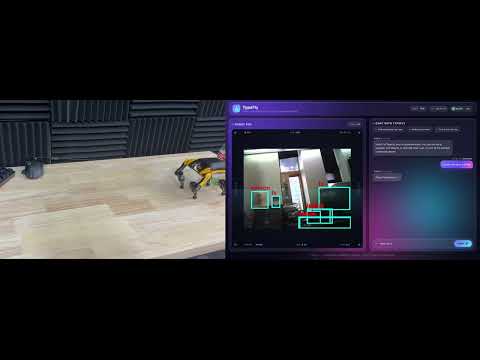
▶️ Demo: a Petoi quadruped finds a bottle (click to watch on YouTube).
TypeFly works with Petoi quadrupeds (Bittle / Nybble / Cub) running the
OpenCatESP32 firmware. The Petoi is driven
over plain HTTP and uses two boards: the OpenCatESP32 control board (locomotion and body
pose, JSON API on port 80) and a separate ESP32-CAM camera board that serves an MJPEG video
stream for YOLO. Set robot_type to petoi and add both board addresses to extra:
{
    "robot_id": "petoi1",
    "robot_type": "petoi",
    "extra": {
        "ip": "192.168.1.50",
        "camera_ip": "192.168.1.51"
    }
}ip(required): the OpenCatESP32 control board address.camera_ip(required for vision): the ESP32-CAM board address.
To support other robots, implement the robot control interface based on RobotWrapper; see the
examples in typefly/platforms/*.
TypeFly uses the OpenAI API as its planner. Put your key in .env (OPENAI_API_KEY=sk-...) —
it's loaded automatically at startup — or export OPENAI_API_KEY=sk-... in your shell.
You can run the YOLO vision service in a container (Linux + NVIDIA GPU recommended). Install the NVIDIA Container Toolkit, then:
make serving_buildOn machines without an NVIDIA GPU the container falls back to CPU (slower). On macOS, prefer the
native pip install -e . && typefly-run path, which uses Apple MPS acceleration when available.
| Symptom | Fix |
|---|---|
| Web UI shows no detections / vision service offline | Make sure the vision service is running. typefly-run starts it for you; if you run the pieces separately, start typefly-serving first. Check it's reachable on EDGE_SERVICE_PORT (default 50049). |
Could not open camera index 0 |
No webcam, or the wrong index. Set extra.capture in typefly/config/robot_info.json to a valid camera index. |
| Vision service seems to hang on first run | It's downloading the YOLO weights (yolov8m.pt, ~50 MB). Wait for it to finish; it's cached afterward. |
OPENAI_API_KEY is not set |
Add your key to .env, or export OPENAI_API_KEY=sk-.... |
Port 50000 already in use |
Stop whatever is using it (the web UI binds 127.0.0.1:50000). |
ModuleNotFoundError: hyrch_serving_pb2 |
gRPC stubs are missing. They're auto-generated on first run; to regenerate manually: cd typefly/proto && bash generate.sh. |
- gRPC stubs are generated automatically the first time the vision service starts. To regenerate
manually after editing
typefly/proto/hyrch_serving.proto:cd typefly/proto && bash generate.sh. - The web UI binds to
127.0.0.1:50000; the vision gateway toEDGE_SERVICE_PORT(default50049); YOLO workers to50050.
TypeFly is licensed under the Apache License 2.0.